QUICK INFO
| Difficulty | Intermediate |
| Time Required | 45-60 minutes |
| Prerequisites | React/Next.js basics, familiarity with async patterns, understanding of what AI agents do |
| Tools Needed | Node.js 18+, CopilotKit v1.50+, an agent backend (LangGraph, CrewAI, or similar) |
What You'll Learn:
- Connect a React frontend to any AG-UI compatible agent backend
- Handle streaming tokens, tool calls, and state updates in the UI
- Implement human-in-the-loop approval flows
- Manage conversation threads that persist across sessions
GUIDE
Connect Any AI Agent to Your React App with CopilotKit's useAgent Hook
Wire up real-time agent communication without building custom WebSocket infrastructure
This guide covers CopilotKit v1.50's useAgent hook and the AG-UI protocol it implements. If you've built agent backends before and wondered why the frontend integration always takes longer than expected, this is the missing piece. We'll go from zero to a working agent UI, including the parts the docs gloss over.
This assumes you have an agent backend ready or can spin one up. If you're starting completely fresh with agents, read CopilotKit's quickstart first, then come back here.
Getting Started
You need CopilotKit v1.50 or later. Earlier versions used a different approach (GraphQL-based) that's now deprecated. The package structure changed in this release, so if you're upgrading from an older version, pay attention to the import paths.
Install the packages:
npm install @copilotkit/react-core @copilotkit/react-ui @copilotkit/runtime
The useAgent hook lives in a versioned import path. This tripped me up initially because the main package exports still work but don't include the new APIs:
// This is the v2 interface - what you want
import { useAgent, CopilotChat } from "@copilotkit/react-core/v2";

// This still works but uses the older patterns
import { useCoAgent } from "@copilotkit/react-core";
Your agent backend needs to speak the AG-UI protocol. If you're using LangGraph, CrewAI, Mastra, Pydantic AI, or Microsoft Agent Framework, there are first-party integrations. For custom backends, you'll implement a Server-Sent Events endpoint that emits the right event types.
Understanding AG-UI (Briefly)
AG-UI sits in a specific spot in the agent stack. MCP handles how agents talk to tools. A2A handles how agents talk to each other. AG-UI handles how agents talk to users through frontend applications.
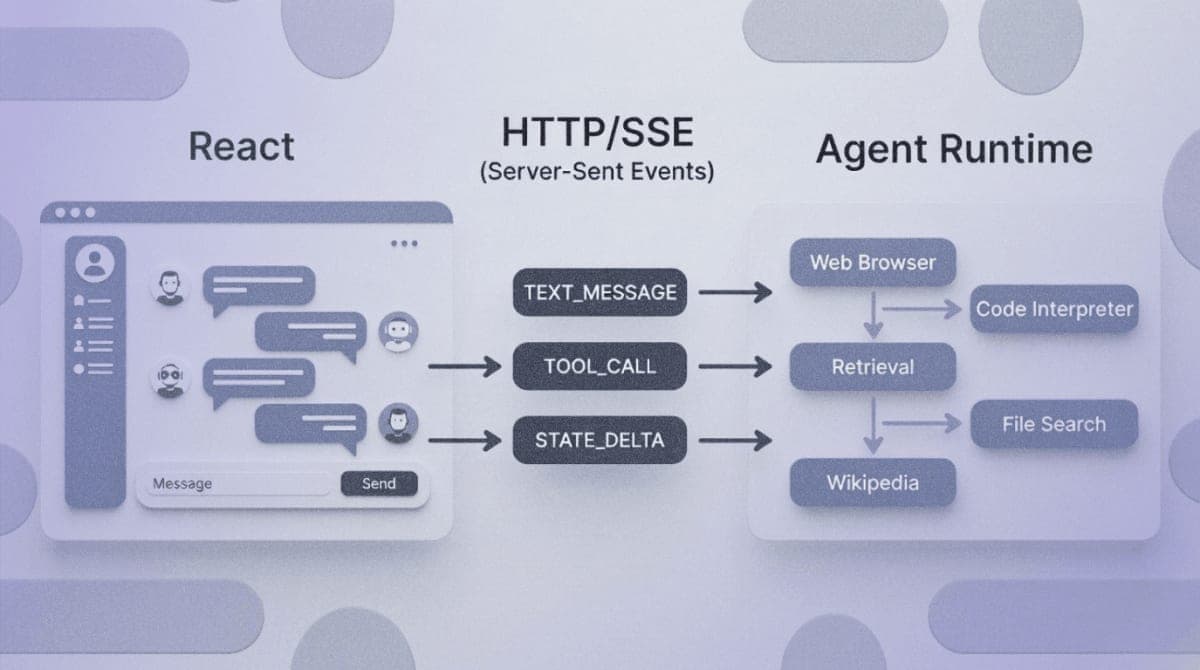
The protocol defines about 16 event types organized into categories: lifecycle events (run started, finished, errors), text message events (streaming tokens), tool call events (when the agent invokes something), and state management events (syncing application state between frontend and backend).
Your frontend POSTs to the agent endpoint, then listens to an SSE stream. Events arrive as they happen. The UI reacts accordingly. That's the core pattern.
Setting Up the CopilotKit Provider
Wrap your app with the CopilotKit provider. This goes in your root layout or app component:
import { CopilotKit } from "@copilotkit/react-core";

export default function App({ children }) {
  return (
    <CopilotKit runtimeUrl="/api/copilotkit">
      {children}
    </CopilotKit>
  );
}
The runtimeUrl points to your API route that handles the CopilotKit runtime. In Next.js, create this at app/api/copilotkit/route.ts:
import { CopilotRuntime, HttpAgent } from "@copilotkit/runtime";
import { NextRequest } from "next/server";

const runtime = new CopilotRuntime({
  agents: {
    default: new HttpAgent({
      url: "http://localhost:8000/agent", // Your AG-UI backend
    }),
  },
});

export async function POST(req: NextRequest) {
  const { handleRequest } = runtime.streamHttpServerResponse(req);
  return handleRequest();
}
Expected result: No visible change yet. The provider just establishes context.
Using the useAgent Hook
This is where it gets interesting. The useAgent hook connects your component to a specific agent and gives you everything needed to interact with it:
import { useAgent } from "@copilotkit/react-core/v2";

function AgentChat() {
  const {
    agent,
    visibleMessages,
    isRunning,
    run,
    stop,
  } = useAgent({
    agentId: "default" // matches the key in your runtime config
  });

  const handleSubmit = async (message) => {
    await run({ message });
  };

  return (
    <div>
      {visibleMessages.map((msg, i) => (
        <div key={i}>{msg.content}</div>
      ))}
      {isRunning && <div>Agent is thinking...</div>}
      {/* Your input component here */}
    </div>
  );
}
The hook subscribes to the AG-UI event stream automatically. When tokens arrive, visibleMessages updates. When the agent starts or stops, isRunning reflects that. You don't manage the WebSocket or SSE connection yourself.
Expected result: When you call run(), you should see messages appearing in the UI as the agent streams its response.
Accessing Agent State
If your agent maintains state (many do), you can read and write it:
const { agent } = useAgent({ agentId: "default" });

// Read current state
console.log(agent.state);

// Update state from the frontend
agent.setState({ userPreference: "dark" });
State synchronization uses AG-UI's STATE_SNAPSHOT and STATE_DELTA events. The protocol supports JSON patches for efficient updates rather than sending the full state blob every time. I haven't tested how well this scales with very large state objects, but for typical conversation context it works fine.
Handling Tool Calls
When an agent calls a tool, the UI can render progress or results. The useRenderToolCall hook lets you provide custom UI for specific tools:
import { useRenderToolCall } from "@copilotkit/react-core";

useRenderToolCall({
  name: "search_web",
  render: ({ args, result, status }) => {
    if (status === "pending") {
      return <div>Searching for: {args.query}...</div>;
    }
    return <div>Found {result.count} results</div>;
  },
});
The status moves through "pending", "executing", and "complete". For tools that take time, this lets you show meaningful progress instead of a generic spinner.
Human-in-the-Loop Patterns
Some agent actions should require user approval before executing. CopilotKit handles this through the useHumanInTheLoop hook:
import { useHumanInTheLoop } from "@copilotkit/react-core";

useHumanInTheLoop({
  onPendingApproval: ({ action, approve, reject }) => {
    // Show confirmation dialog
    // Call approve() or reject() based on user choice
  },
});
The agent backend signals it needs approval by emitting specific tool call events. The frontend intercepts these, presents them to the user, and sends the decision back. The agent run pauses until the user responds.
This pattern is important for actions with real consequences. Actually, I should clarify: the exact implementation depends on your agent framework. LangGraph and Microsoft Agent Framework have specific patterns for this. Check the AG-UI integration docs for your backend.
Thread Persistence
Conversations can persist across page refreshes. v1.50 added built-in thread support:
// In your runtime setup
import { InMemoryAgentRunner, SQLiteAgentRunner } from "@copilotkit/runtime";

const runtime = new CopilotRuntime({
  agents: { default: agent },
  runner: new SQLiteAgentRunner({
    dbPath: "./threads.db"
  }),
});
On the frontend, threads are managed automatically. The useAgent hook reconnects to existing threads when the component mounts. If you need manual control:
const { threadId, setThreadId, clearThread } = useAgent({
  agentId: "default"
});

// Start fresh conversation
clearThread();

// Switch to specific thread
setThreadId("abc123");
The InMemory runner is fine for development. For production, use SQLite or implement your own runner interface.
Troubleshooting
Symptom: useAgent is not exported from @copilotkit/react-core
Fix: Import from the v2 path: @copilotkit/react-core/v2. This is a v1.50+ feature.
Symptom: Agent responses don't appear, but no errors in console
Fix: Check your runtime URL configuration. The POST request should return a streaming response. Look at the Network tab for the actual response content type (should be text/event-stream).
Symptom: State updates from agent don't reflect in UI
Fix: Make sure your agent backend emits STATE_SNAPSHOT or STATE_DELTA events. Not all agent frameworks do this by default. For LangGraph, check the emitIntermediateState configuration.
Symptom: CORS errors when connecting to agent backend Fix: If your agent runs on a different port, you need CORS headers. For development, proxy through your Next.js API route instead of hitting the agent directly.
Symptom: Connection drops after 30 seconds of agent "thinking" Fix: Some infrastructure (Vercel, nginx) has SSE timeout defaults. Increase the timeout or ensure your agent sends periodic keepalive events.
What's Next
You've got a working agent-to-UI connection. The logical next step depends on what you're building. For complex multi-step workflows, look into the state management patterns in the CopilotKit docs. For generative UI where the agent can render custom components, check useRenderToolCall examples.
The AG-UI specification covers event types in detail if you're implementing a custom backend or debugging protocol-level issues.
PRO TIPS
The v2 imports (@copilotkit/react-core/v2) can coexist with v1 patterns. You can migrate incrementally rather than rewriting everything at once.
useAgent is a superset of the older useCoAgent. If you're reading older tutorials, mentally translate useCoAgent to useAgent.
For debugging, the AG-UI events are just JSON over SSE. You can inspect them in browser DevTools under the Network tab, then click the EventStream tab for the request.
If your agent framework isn't officially supported, implementing AG-UI compatibility is straightforward. You need an HTTP endpoint that accepts a POST with the conversation, then streams back JSON events with the right type fields. Start with just RUN_STARTED, TEXT_MESSAGE_CONTENT, TEXT_MESSAGE_END, and RUN_FINISHED.
FAQ
Q: Does AG-UI work with frameworks other than React? A: CopilotKit provides first-party React and Angular clients. There are community clients for other frameworks, and you can always consume the raw SSE stream from any JavaScript environment.
Q: Can I use this without CopilotKit? A: AG-UI is an open protocol. You can implement clients and servers independently. CopilotKit just provides a polished React implementation with extra features.
Q: What's the difference between AG-UI and A2UI? A: Different things despite similar names. AG-UI is the agent-to-user protocol (this guide). A2UI is Google's generative UI specification for rendering agent-produced widgets. They're complementary.
Q: How does this compare to just using the OpenAI SDK directly? A: Direct SDK calls work fine for simple chat. AG-UI adds value when you need tool execution visibility, state synchronization, human-in-the-loop flows, or multi-agent coordination through a consistent interface.
RESOURCES
- CopilotKit v1.50 Release Notes: Details on the useAgent hook and thread support
- AG-UI Protocol Specification: Event types, transport options, and protocol details
- AG-UI GitHub Repository: Reference implementations and framework integrations
- CopilotKit Documentation: Full API reference and integration guides