QUICK INFO
| Difficulty | Beginner |
| Time Required | 45 minutes |
| Prerequisites | Python 3.10+, AWS account with Bedrock access, basic Python knowledge |
| Tools Needed | pip, AWS CLI (configured), text editor or IDE |
What You'll Learn:
- Install and configure Strands Agents SDK with AWS Bedrock
- Create agents with built-in and custom tools
- Build practical applications: weather assistant, file processor, research agent
- Deploy agents to production environments
This guide covers installing the Strands Agents SDK, configuring model providers, building custom tools, and creating practical agent applications. You need Python 3.10+, an AWS account with Bedrock model access enabled, and familiarity with Python basics.
Getting Started
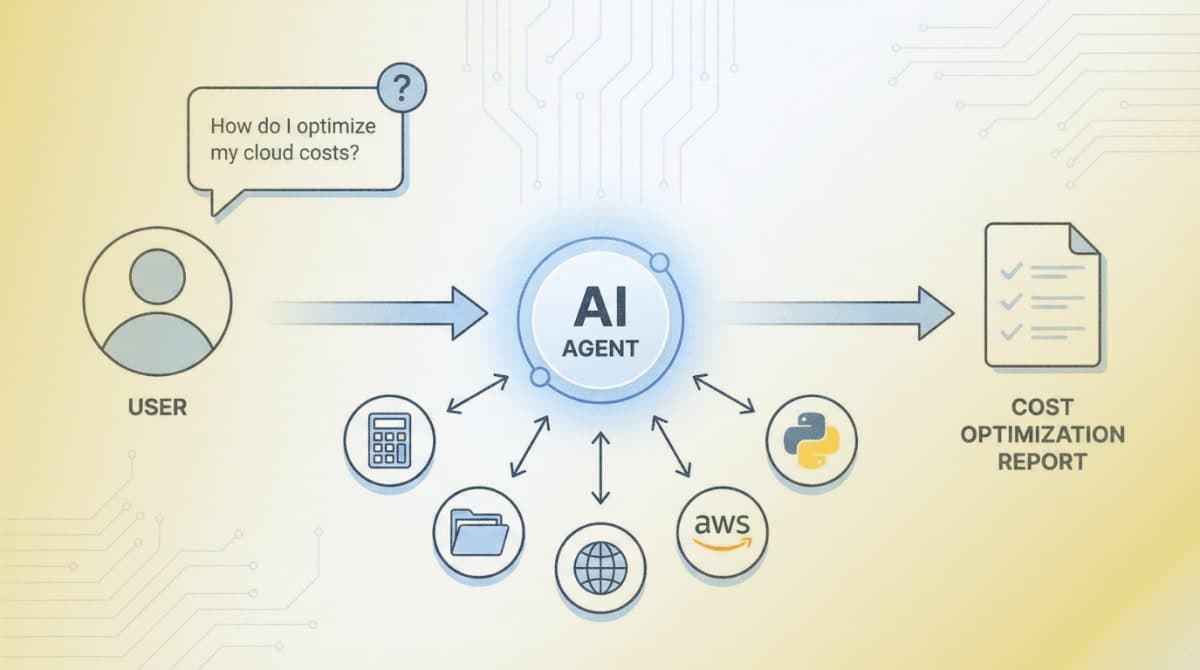
Strands Agents is an open-source SDK from AWS that uses a model-driven approach to agent development. The framework connects two core components: the model (for reasoning) and tools (for actions). Production teams at AWS, including Amazon Q Developer and AWS Glue, use Strands in their deployments.
Step 1: Create Your Project Environment
Open your terminal and create a project directory:
mkdir my_strands_agent
cd my_strands_agent
Create and activate a virtual environment:
python -m venv .venv
source .venv/bin/activate  # macOS/Linux
# Windows CMD: .venv\Scripts\activate.bat
# Windows PowerShell: .venv\Scripts\Activate.ps1
Step 2: Install the SDK
Install the core SDK and the community tools package:
pip install strands-agents strands-agents-tools
The strands-agents package provides the core Agent class and model providers. The `strands-agents-tools` package includes 25+ pre-built tools for file operations, HTTP requests, calculations, and AWS service interactions.
Expected result: Both packages install without errors. Run pip show strands-agents to verify installation.
Step 3: Configure AWS Credentials
Strands defaults to Amazon Bedrock as the model provider with Claude 4 Sonnet. Configure your AWS credentials using one of these methods:
Option A: Environment variables
export AWS_ACCESS_KEY_ID=your_access_key
export AWS_SECRET_ACCESS_KEY=your_secret_key
export AWS_DEFAULT_REGION=us-west-2
Option B: AWS CLI configuration
aws configure
Enter your access key, secret key, and set the region to us-west-2 (required for Bedrock Claude 4 access).
Step 4: Enable Bedrock Model Access
Log into the AWS Console and navigate to Amazon Bedrock. Select "Model access" from the left menu. Request access for "Claude 4 Sonnet" from Anthropic. Access approval typically takes a few minutes.
Expected result: The Claude 4 Sonnet model shows "Access granted" status in the Bedrock console.
Creating Your First Agent
Step 5: Write a Basic Agent
Create a file named agent.py:
from strands import Agent

agent = Agent()
response = agent("What is the capital of France?")
print(response.message)
Run it:
python agent.py
Expected result: The agent responds with information about Paris. The terminal displays the agent's reasoning process and final response.
Step 6: Add Built-in Tools
Tools extend what agents can do. Modify agent.py to include calculator and time tools:
from strands import Agent
from strands_tools import calculator, current_time

agent = Agent(tools=[calculator, current_time])

response = agent("""
I need help with two things:
1. What time is it right now?
2. Calculate 3111696 divided by 74088
""")
The agent automatically determines when to use each tool based on the request.
Expected result: The agent uses the current_time tool to get the time, then the calculator tool for the math operation.
Step 7: Create Custom Tools
Define your own tools using the @tool decorator. The docstring becomes the tool description that the model uses to decide when to invoke it:
from strands import Agent, tool

@tool
def word_count(text: str) -> int:
    """
    Count the number of words in a text string.

    Args:
        text: The input text to count words in

    Returns:
        The number of words in the text
    """
    return len(text.split())

@tool
def reverse_string(text: str) -> str:
    """
    Reverse the characters in a string.

    Args:
        text: The string to reverse

    Returns:
        The reversed string
    """
    return text[::-1]

agent = Agent(tools=[word_count, reverse_string])
response = agent("How many words are in 'The quick brown fox' and what is it reversed?")
Type hints in the function signature define the input schema. The model extracts parameters from the user's natural language request.
Building Practical Applications
Example 1: Weather Information Assistant
This agent fetches real weather data using HTTP requests. Create weather_agent.py:
from strands import Agent, tool
import json

@tool
def get_weather(city: str) -> str:
    """
    Get current weather information for a city.

    Args:
        city: Name of the city to get weather for

    Returns:
        Weather information as a formatted string
    """
    from strands_tools import http_request

    # Using wttr.in public API (no key required)
    url = f"https://wttr.in/{city}?format=j1"

    try:
        # Make HTTP request directly
        import urllib.request
        with urllib.request.urlopen(url) as response:
            data = json.loads(response.read().decode())
            current = data['current_condition'][0]
            return f"""
Weather in {city}:
- Temperature: {current['temp_C']}°C ({current['temp_F']}°F)
- Condition: {current['weatherDesc'][0]['value']}
- Humidity: {current['humidity']}%
- Wind: {current['windspeedKmph']} km/h
"""
    except Exception as e:
        return f"Could not fetch weather data: {str(e)}"

@tool
def compare_temperatures(city1: str, city2: str) -> str:
    """
    Compare temperatures between two cities.

    Args:
        city1: First city name
        city2: Second city name

    Returns:
        Comparison of temperatures between the two cities
    """
    weather1 = get_weather.func(city1)  # Call the underlying function
    weather2 = get_weather.func(city2)
    return f"City 1:\n{weather1}\n\nCity 2:\n{weather2}"

agent = Agent(
    system_prompt="You are a helpful weather assistant. Provide concise weather information and comparisons when asked.",
    tools=[get_weather, compare_temperatures]
)

# Interactive loop
print("Weather Assistant (type 'quit' to exit)")
while True:
    user_input = input("\nYou: ")
    if user_input.lower() == 'quit':
        break
    response = agent(user_input)
Example 2: File Processing Agent
This agent reads, analyzes, and writes files. Create file_agent.py:
from strands import Agent
from strands_tools import file_read, file_write, python_repl

agent = Agent(
    system_prompt="""You are a file processing assistant. You can:
- Read files and analyze their contents
- Process data using Python
- Write results to new files
Always explain what you're doing before executing operations.""",
    tools=[file_read, file_write, python_repl]
)

# Example: Analyze a CSV file
response = agent("""
Read the file 'sales_data.csv', calculate the total sales amount,
and write a summary to 'sales_summary.txt'
""")
Example 3: Research Agent with Web Search
This agent uses the Tavily search API for web research. You need a Tavily API key (free tier available at tavily.com):
import os
from strands import Agent
from strands_tools import tavily_search

# Set your Tavily API key
os.environ['TAVILY_API_KEY'] = 'your_tavily_api_key'

agent = Agent(
    system_prompt="""You are a research assistant. When asked about topics:
1. Search for current, reliable information
2. Synthesize findings into clear summaries
3. Cite your sources""",
    tools=[tavily_search]
)

response = agent("What are the latest developments in AI agent frameworks?")
Example 4: AWS Service Integration Agent
This agent interacts with AWS services. Create aws_agent.py:
from strands import Agent
from strands_tools import use_aws

agent = Agent(
    system_prompt="You are an AWS assistant that helps manage cloud resources. List resources, describe configurations, and provide recommendations.",
    tools=[use_aws]
)

# List S3 buckets
response = agent("List all my S3 buckets and tell me which region each is in")

# Describe EC2 instances
response = agent("Show me all running EC2 instances in us-west-2")
The use_aws tool wraps boto3 and can access any AWS service operation.
Example 5: Multi-Agent System
Create specialized agents that work together. Create multi_agent.py:
from strands import Agent, tool
from strands_tools import calculator, tavily_search, file_write

# Specialized research agent
research_agent = Agent(
    system_prompt="You are a research specialist. Find accurate, current information on topics.",
    tools=[tavily_search]
)

# Specialized analysis agent
analysis_agent = Agent(
    system_prompt="You are a data analyst. Calculate statistics and analyze numerical data.",
    tools=[calculator]
)

# Wrap agents as tools for an orchestrator
@tool
def research(query: str) -> str:
    """
    Research a topic using web search.

    Args:
        query: The topic to research

    Returns:
        Research findings
    """
    result = research_agent(query)
    return result.message

@tool
def analyze(data: str) -> str:
    """
    Analyze data and perform calculations.

    Args:
        data: The data or calculation to analyze

    Returns:
        Analysis results
    """
    result = analysis_agent(data)
    return result.message

# Orchestrator that coordinates the specialists
orchestrator = Agent(
    system_prompt="""You are a project coordinator. When given complex tasks:
1. Break them into subtasks
2. Delegate research tasks to the research tool
3. Delegate calculations to the analyze tool
4. Synthesize results into a comprehensive response""",
    tools=[research, analyze, file_write]
)

response = orchestrator("""
Research the current market cap of the top 5 tech companies,
calculate the total combined market cap,
and save a summary report to 'tech_report.txt'
""")
Using Alternative Model Providers
OpenAI
from strands import Agent
from strands.models.openai import OpenAIModel

model = OpenAIModel(
    client_args={"api_key": "your_openai_api_key"},
    model_id="gpt-4o"
)

agent = Agent(model=model)
Anthropic Direct API
from strands import Agent
from strands.models.anthropic import AnthropicModel

model = AnthropicModel(
    client_args={"api_key": "your_anthropic_api_key"},
    model_id="claude-sonnet-4-20250514"
)

agent = Agent(model=model)
Ollama (Local Models)
from strands import Agent
from strands.models.ollama import OllamaModel

model = OllamaModel(
    host="http://localhost:11434",
    model_id="llama3.1"
)

agent = Agent(model=model)
Handling Agent Responses
Every agent invocation returns an AgentResult object with observability data:
from strands import Agent
from strands_tools import calculator

agent = Agent(tools=[calculator])
result = agent("What is the square root of 144?")

# Access the final response
print(result.message)

# View metrics
print(result.metrics.get_summary())

# Access token usage
print(f"Input tokens: {result.metrics.accumulated_usage['inputTokens']}")
print(f"Output tokens: {result.metrics.accumulated_usage['outputTokens']}")

# View the trace of agent reasoning
for trace in result.traces:
    print(f"Step: {trace['name']}, Duration: {trace.get('duration', 'N/A')}s")
Async and Streaming Support
For web applications, use async methods:
import asyncio
from strands import Agent
from strands_tools import calculator

agent = Agent(tools=[calculator], callback_handler=None)

async def process_async():
    # Async invocation
    result = await agent.invoke_async("Calculate 25 * 48")
    print(result.message)

    # Streaming events
    async for event in agent.stream_async("Explain step by step: 144 / 12"):
        if "data" in event:
            print(event["data"], end="", flush=True)

asyncio.run(process_async())
Troubleshooting
Symptom: AccessDeniedException: User is not authorized to perform bedrock:InvokeModel
Fix: Enable model access in the Bedrock console. Navigate to Amazon Bedrock > Model access > Claude 4 Sonnet > Request access.
Symptom: ResourceNotFoundException: Could not resolve the foundation model
Fix: Change your region to us-west-2 where Claude 4 is available. Set AWS_DEFAULT_REGION=us-west-2 or pass region_name="us-west-2" to BedrockModel.
Symptom: Agent hangs or times out on tool execution
Fix: Tools like shell and python_repl require user confirmation by default. Set BYPASS_TOOL_CONSENT=true in environment variables for automated workflows, or handle the confirmation programmatically.
Symptom: ModuleNotFoundError: No module named 'strands_tools'
Fix: Install the tools package separately: pip install strands-agents-tools
What's Next
You now have agents that can reason, use tools, and complete complex tasks. For deployment to production, see the Strands documentation on AWS Lambda, Fargate, and EKS deployment patterns at strandsagents.com/latest/documentation/docs/user-guide/deploy/.
PRO TIPS
- Set
callback_handler=Noneto disable console output during agent execution, useful for production deployments - Use
BYPASS_TOOL_CONSENT=trueenvironment variable to skip confirmation prompts for tools like shell and python_repl - Access
result.metrics.get_summary()after each invocation to monitor token usage and debug slow responses - Define tool docstrings with clear Args and Returns sections, the model uses these to determine when and how to call tools
- Use
logging.getLogger("strands").setLevel(logging.DEBUG)to see detailed agent reasoning steps
COMMON MISTAKES
- Missing region configuration: Bedrock models require specific regions. Claude 4 is available in us-west-2. Always set AWS_DEFAULT_REGION or pass region to the model constructor.
- Vague tool docstrings: Tools with unclear descriptions get used incorrectly. Include specific use cases in docstrings: "Use this tool when the user asks about file contents" rather than "File tool."
- Not handling tool errors: Tools can fail (network issues, permission errors). Wrap tool logic in try/except and return informative error messages the agent can act on.
- Overloading system prompts: Long system prompts consume tokens on every request. Keep prompts under 500 words and move detailed instructions into tool docstrings.
PROMPT TEMPLATES
Research and Summarize
Research [TOPIC] and provide:
1. A brief overview (2-3 sentences)
2. Key facts or statistics
3. Recent developments
4. Sources for further reading
Customize by: Replace [TOPIC] with your subject area
Example output: "Research quantum computing and provide: 1. A brief overview..." returns a structured summary with sources from web search.
Data Analysis Request
Analyze the data in [FILENAME]:
1. Load and inspect the data structure
2. Calculate [SPECIFIC METRICS]
3. Identify any anomalies or patterns
4. Save results to [OUTPUT_FILE]
Customize by: Specify the filename, metrics (mean, sum, trends), and output destination
Multi-Step Task
Complete this task in order:
1. First, [RESEARCH/GATHER STEP]
2. Then, [PROCESS/CALCULATE STEP]
3. Finally, [OUTPUT/SAVE STEP]
Explain your reasoning at each step.
Customize by: Define the three phases of your workflow
FAQ
Q: Can I use Strands with models other than Bedrock?
A: Yes. Strands supports OpenAI, Anthropic direct API, Ollama for local models, LiteLLM for unified access, Mistral, and more. Import the appropriate model class from strands.models.
Q: How do I persist conversation state across sessions? A: Use the SessionManager class. Strands supports S3, DynamoDB, and custom session backends. See the session-management documentation for implementation details.
Q: What's the difference between strands-agents and strands-agents-tools?
A: strands-agents is the core SDK with Agent, model providers, and the tool decorator. strands-agents-tools is a separate package with 25+ pre-built tools (calculator, file operations, HTTP, AWS, etc.) maintained by the community.
Q: How do I limit token usage or costs?
A: Pass max_tokens to your model configuration. Monitor usage via result.metrics.accumulated_usage after each call. Consider using smaller models like Claude Haiku for simple tasks.
Q: Can agents call each other?
A: Yes. Use the agents-as-tools pattern: wrap an agent call in a @tool decorated function, then pass it to another agent. This enables hierarchical delegation and specialized agent teams.
Q: Why does my agent keep looping without finishing?
A: The agent may be stuck in reasoning. Check the trace via result.traces to see where it loops. Add clearer instructions in the system prompt about when to stop, or set a max iterations limit.
RESOURCES
- Strands Agents Documentation: Official guides, API reference, and deployment tutorials
- strands-agents-tools Repository: Source code and documentation for all pre-built tools
- Strands SDK Python Repository: Core SDK source, examples, and issue tracker
- AWS Bedrock Documentation: Model access setup and pricing information
- Strands Samples Repository: Production-ready example implementations