QUICK INFO
| Difficulty | Intermediate |
| Time Required | 45-60 minutes |
| Prerequisites | Completed basic skills tutorial; familiarity with Python or Bash; understanding of SKILL.md structure |
| Tools Needed | Claude.ai (Pro/Max/Team/Enterprise), text editor, Python 3.8+ |
What You'll Learn:
- Structuring skills with multiple reference files
- Writing utility scripts Claude can execute
- Implementing validation and feedback loops
- Organizing large skills using progressive disclosure
Basic skills work fine for simple workflows: a single SKILL.md file with instructions. But when you're dealing with multi-step processes, error-prone operations, or domain-specific knowledge that runs hundreds of lines, you need more structure.
This guide covers how Anthropic's production skills actually work. We'll examine real patterns from the PDF, DOCX, and MCP builder skills, then apply those patterns to your own work.
When You Need More Than SKILL.md
A single SKILL.md file works until it doesn't. Signs you've outgrown it:
Your file exceeds 500 lines. Claude will load the entire thing when the skill triggers, consuming context that could go toward your actual task.
You're repeating the same code patterns. If Claude generates the same 20-line Python snippet every time someone rotates a PDF, that's wasted tokens and potential for inconsistency.
Different tasks need different subsets of information. A PDF skill shouldn't load form-filling instructions when someone just wants to extract text.
Operations are fragile. XML manipulation, file format conversions, coordinate calculations: these need deterministic code, not generated approximations.
Skill Directory Structure
A fully-featured skill might look like this:
pdf-processing/
├── SKILL.md              # Main instructions (loaded when triggered)
├── FORMS.md              # Form-filling workflow (loaded when needed)
├── REFERENCE.md          # API details (loaded when needed)
├── scripts/
│   ├── check_fillable_fields.py
│   ├── extract_form_field_info.py
│   ├── fill_fillable_fields.py
│   ├── convert_pdf_to_images.py
│   ├── check_bounding_boxes.py
│   └── create_validation_image.py
└── assets/
    └── (templates, if any)
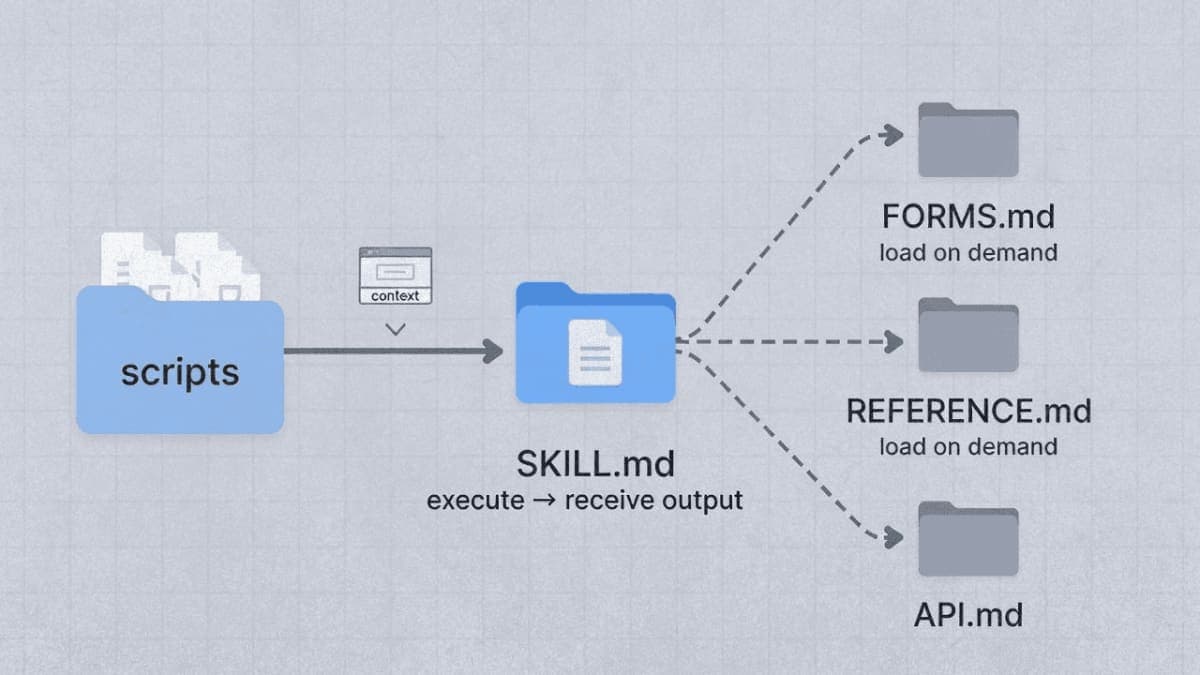
The key insight: scripts execute without loading into context. Claude runs check_bounding_boxes.py and receives only the output. The script's 70 lines of Python never consume context tokens.
Reference files load on demand. When a user asks about form filling, Claude reads FORMS.md. When they ask about text extraction, it stays on disk.
Writing Reference Files
Reference files extend SKILL.md without bloating it. The main file stays lean, pointing readers to details as needed.
Pattern: Conditional Loading
From Anthropic's DOCX skill:
# DOCX creation, editing, and analysis

## Workflow Decision Tree

### Creating New Document
Use "Creating a new Word document" workflow

### Editing Existing Document
- **Your own document + simple changes**
  Use "Basic OOXML editing" workflow

- **Someone else's document**
  Use **"Redlining workflow"** (recommended default)

## Creating a new Word document

When creating a new Word document from scratch, use **docx-js**.

### Workflow
1. **MANDATORY - READ ENTIRE FILE**: Read [`docx-js.md`](docx-js.md)
   completely from start to finish.
2. Create a JavaScript/TypeScript file using Document, Paragraph,
   TextRun components
3. Export as .docx using Packer.toBuffer()

## Editing an existing Word document

### Workflow
1. **MANDATORY - READ ENTIRE FILE**: Read [`ooxml.md`](ooxml.md)
   completely from start to finish.
2. Unpack the document
3. Create and run a Python script using the Document library
4. Pack the final document
SKILL.md weighs under 200 lines. The actual details live in docx-js.md (500 lines of JavaScript patterns) and ooxml.md (630 lines of XML specifications). Claude loads whichever one matches the task.
Pattern: Domain Organization
When your skill covers multiple domains, organize by topic:
bigquery-skill/
├── SKILL.md
└── reference/
    ├── finance.md      # Revenue, billing metrics
    ├── sales.md        # Pipeline, opportunities
    ├── product.md      # Usage analytics
    └── marketing.md    # Campaign attribution
SKILL.md contains:
## Available Datasets

**Finance**: Revenue, ARR, billing → See [reference/finance.md](reference/finance.md)
**Sales**: Opportunities, pipeline → See [reference/sales.md](reference/sales.md)
**Product**: API usage, features → See [reference/product.md](reference/product.md)
**Marketing**: Campaigns, attribution → See [reference/marketing.md](reference/marketing.md)

## Quick Search

Find specific metrics:

```bash
grep -i "revenue" reference/finance.md
grep -i "pipeline" reference/sales.md
When someone asks about sales pipeline, Claude reads only `sales.md`. The finance schemas stay unloaded.

### Structuring Long Reference Files

If a reference file exceeds 100 lines, add a table of contents. Claude sometimes previews files with partial reads. A TOC at the top ensures it sees what's available.

From `ooxml.md`:

```markdown
# Office Open XML Technical Reference

**Important: Read this entire document before starting.** This document covers:
- [Technical Guidelines](#technical-guidelines) - Schema compliance rules
- [Document Content Patterns](#document-content-patterns) - XML patterns for
  headings, lists, tables
- [Document Library (Python)](#document-library-python) - Recommended approach
  for OOXML manipulation
- [Tracked Changes (Redlining)](#tracked-changes-redlining) - XML patterns for
  implementing tracked changes

## Technical Guidelines

### Schema Compliance
- **Element ordering in `<w:pPr>`**: `<w:pStyle>`, `<w:numPr>`, `<w:spacing>`...
Avoiding Deep Nesting
Keep reference files one level from SKILL.md. If SKILL.md points to advanced.md, which points to details.md, Claude may only partially read nested files.
Bad:
SKILL.md → advanced.md → details.md → specifics.md
Good:
SKILL.md → advanced.md
SKILL.md → details.md
SKILL.md → specifics.md
Writing Utility Scripts
Scripts handle operations where code beats instructions: validation, file format conversion, calculations requiring precision, anything you'd rather not regenerate each time.
Script Design Principles
Handle errors explicitly. Don't punt to Claude when something fails.
From check_bounding_boxes.py in Anthropic's PDF skill:
def get_bounding_box_messages(fields_json_stream) -> list[str]:
    messages = []
    fields = json.load(fields_json_stream)
    messages.append(f"Read {len(fields['form_fields'])} fields")

    has_error = False
    for i, ri in enumerate(rects_and_fields):
        for j in range(i + 1, len(rects_and_fields)):
            rj = rects_and_fields[j]
            if rects_intersect(ri.rect, rj.rect):
                has_error = True
                messages.append(
                    f"FAILURE: intersection between {ri.rect_type} "
                    f"bounding box for `{ri.field['description']}` "
                    f"({ri.rect}) and {rj.rect_type} bounding box for "
                    f"`{rj.field['description']}` ({rj.rect})"
                )
                if len(messages) >= 20:
                    messages.append("Aborting further checks; fix and try again")
                    return messages

    if not has_error:
        messages.append("SUCCESS: All bounding boxes are valid")
    return messages
Notice what this does: specific error messages with field names and coordinates. Claude can read "FAILURE: intersection between label bounding box for 'Last name' and entry bounding box for 'First name'" and know exactly what to fix.
Compare that to a script that just crashes with a stack trace. Claude would have to interpret the error, guess at causes, and hope it gets the fix right.
Return actionable output. Scripts should produce messages Claude can act on immediately.
if len(sys.argv) != 2:
    print("Usage: check_bounding_boxes.py [fields.json]")
    sys.exit(1)
Document magic constants. If you're using a specific value, explain why:
# Font size 14 is the default for form fields
# Entry box must be at least this tall to fit text
font_size = ri.field["entry_text"].get("font_size", 14)
entry_height = ri.rect[3] - ri.rect[1]
if entry_height < font_size:
    messages.append(
        f"FAILURE: entry bounding box height ({entry_height}) for "
        f"`{ri.field['description']}` is too short for font size {font_size}"
    )
Referencing Scripts in SKILL.md
Make the intent clear. "Run this script" versus "read this script for reference" are different operations.
For execution:
## Validation

Check field mapping before proceeding:

```bash
python scripts/check_bounding_boxes.py fields.json
The script returns "SUCCESS: All bounding boxes are valid" or lists specific errors.
**For reference (rare):**

```markdown
## Algorithm Details

See `scripts/analyze_form.py` for the field extraction algorithm.
The script walks the PDF structure looking for widget annotations.
Most scripts should be executed, not read. Execution is token-efficient and deterministic.
Script Organization
Group related scripts. The PDF skill organizes by task:
scripts/
├── check_fillable_fields.py      # Detection
├── extract_form_field_info.py    # Extraction
├── convert_pdf_to_images.py      # Conversion
├── check_bounding_boxes.py       # Validation
├── create_validation_image.py    # Visual debugging
├── fill_fillable_fields.py       # Fill operation
└── fill_pdf_form_with_annotations.py  # Alternative fill
Each script does one thing. Claude chains them according to the workflow.
Building Validation Workflows
Complex operations need feedback loops. The pattern: do something, validate it, fix problems, repeat until clean.
The PDF Form-Filling Workflow
From Anthropic's FORMS.md, a complete validation workflow:
## Non-fillable fields

If the PDF doesn't have fillable form fields, follow these steps *exactly*:

### Step 1: Visual Analysis (REQUIRED)
- Convert the PDF to PNG images:
  `python scripts/convert_pdf_to_images.py <file.pdf> <output_directory>`
- Examine each PNG and identify form fields
- Determine bounding boxes for labels and entry areas

### Step 2: Create fields.json and validation images (REQUIRED)
- Create `fields.json` with field information
- Create validation images:
  `python scripts/create_validation_image.py <page> <fields.json> <input.png> <output.png>`
- Validation images show red rectangles for entry areas, blue for labels

### Step 3: Validate Bounding Boxes (REQUIRED)

#### Automated intersection check
`python scripts/check_bounding_boxes.py fields.json`

If there are errors, adjust bounding boxes and iterate until no errors remain.

#### Manual image inspection
**CRITICAL: Do not proceed without visually inspecting validation images**
- Red rectangles must ONLY cover input areas
- Red rectangles MUST NOT contain any text
- Blue rectangles should contain label text

If any rectangles look wrong, fix fields.json, regenerate validation images,
and verify again.

### Step 4: Add annotations to the PDF
`python scripts/fill_pdf_form_with_annotations.py <input.pdf> <fields.json> <output.pdf>`
Notice the structure: each step has a clear purpose, a specific script to run, and criteria for when to proceed versus iterate.
Validation Script Patterns
A good validation script:
- Accepts the artifact to validate as input
- Checks specific conditions
- Returns clear pass/fail with details on failures
- Exits early when too many errors accumulate
# Returns a list of messages that are printed to stdout for Claude to read.
def get_bounding_box_messages(fields_json_stream) -> list[str]:
    messages = []

    # ... validation logic ...

    if len(messages) >= 20:
        messages.append("Aborting further checks; fix bounding boxes and try again")
        return messages

    if not has_error:
        messages.append("SUCCESS: All bounding boxes are valid")
    return messages
The 20-error limit prevents runaway output. If there are that many problems, Claude should fix the obvious ones before continuing.
Checklists for Complex Workflows
For multi-step processes, provide a checklist Claude can track:
## Document Editing Process

Copy this checklist and track your progress:
Task Progress:
- Step 1: Unpack document (run unpack.py)
- Step 2: Identify changes needed
- Step 3: Create editing script
- Step 4: Run script
- Step 5: Validate changes (run validate.py)
- Step 6: Pack document (run pack.py)
- Step 7: Final verification
This prevents Claude from skipping steps or losing track mid-workflow.
Degrees of Freedom
Match instruction specificity to how fragile the operation is.
High Freedom: Multiple Approaches Valid
For code review, many approaches work:
## Code Review Process

1. Analyze the code structure and organization
2. Check for potential bugs or edge cases
3. Suggest improvements for readability
4. Verify adherence to project conventions

Adapt emphasis based on the code's purpose and context.
Claude decides the specifics based on what it sees.
Low Freedom: Exact Sequence Required
For tracked changes in Word documents, precision matters:
## Tracked Changes Workflow

**Principle: Minimal, Precise Edits**

Only mark text that actually changes. Repeating unchanged text makes
edits harder to review.

Example - Changing "30 days" to "60 days":

```python
# BAD - Replaces entire sentence
'<w:del><w:delText>The term is 30 days.</w:delText></w:del>
 <w:ins><w:t>The term is 60 days.</w:t></w:ins>'

# GOOD - Only marks what changed
'<w:r><w:t>The term is </w:t></w:r>
 <w:del><w:delText>30</w:delText></w:del>
 <w:ins><w:t>60</w:t></w:ins>
 <w:r><w:t> days.</w:t></w:r>'
The bad/good example leaves no ambiguity. Claude follows the pattern exactly.

### Medium Freedom: Preferred Pattern with Flexibility

For API implementations:

```markdown
## Tool Implementation

For each tool:

**Input Schema:**
- Use Zod (TypeScript) or Pydantic (Python)
- Include constraints and clear descriptions
- Add examples in field descriptions

**Implementation:**
- Async/await for I/O operations
- Proper error handling with actionable messages
- Support pagination where applicable
Guidelines without rigid structure. Claude adapts to the specific API.
Practical Example: Building a Data Validation Skill
Let's build a skill that validates CSV data against a schema. This demonstrates scripts, reference files, and validation workflows together.
Directory Structure
csv-validator/
├── SKILL.md
├── SCHEMA_FORMAT.md
└── scripts/
    ├── validate_schema.py
    ├── validate_data.py
    └── generate_report.py
SKILL.md
---
name: csv-validator
description: Validates CSV files against JSON schemas. Checks column types,
required fields, value constraints, and data consistency. Use when validating
data files, checking imports before database load, or auditing CSV exports.
---

# CSV Data Validation

## Quick Start

1. Define your schema (see format below)
2. Run validation: `python scripts/validate_data.py data.csv schema.json`
3. Review the report

## Schema Format

See [SCHEMA_FORMAT.md](SCHEMA_FORMAT.md) for complete schema specification
including types, constraints, and examples.

## Validation Workflow

### Step 1: Validate Schema First

Before checking data, verify the schema itself:

```bash
python scripts/validate_schema.py schema.json
Returns "Schema valid" or lists structural problems.
Step 2: Validate Data
python scripts/validate_data.py data.csv schema.json
Output shows:
- Row count and column summary
- Errors by category (type mismatches, constraint violations, missing required)
- First 10 examples of each error type
Step 3: Generate Report (Optional)
For detailed analysis:
python scripts/generate_report.py data.csv schema.json report.md
Creates a markdown report with error distribution, affected rows, and suggested fixes.
Common Issues
"Column not in schema": Schema missing a column definition. Add it to schema.json or verify the column name matches.
Type mismatch errors: Check the expected type in schema. Common issue:
numbers stored as strings need "type": "string" with a number pattern.
### SCHEMA_FORMAT.md

```markdown
# Schema Format Specification

## Structure

```json
{
  "columns": [
    {
      "name": "column_name",
      "type": "string|integer|float|boolean|date",
      "required": true,
      "constraints": {}
    }
  ],
  "rules": []
}
Column Types
string
Text values. Optional constraints:
pattern: Regex the value must matchenum: Array of allowed valuesminLength,maxLength: Length bounds
integer
Whole numbers. Optional constraints:
min,max: Value boundsenum: Allowed values
float
Decimal numbers. Constraints same as integer.
boolean
True/false. Accepts: true, false, 1, 0, yes, no (case-insensitive)
date
Date values. Constraint:
format: Expected format (default: ISO 8601)
Example Schema
{
  "columns": [
    {
      "name": "email",
      "type": "string",
      "required": true,
      "constraints": {
        "pattern": "^[^@]+@[^@]+\\.[^@]+$"
      }
    },
    {
      "name": "age",
      "type": "integer",
      "required": false,
      "constraints": {
        "min": 0,
        "max": 150
      }
    },
    {
      "name": "status",
      "type": "string",
      "required": true,
      "constraints": {
        "enum": ["active", "inactive", "pending"]
      }
    }
  ]
}
### scripts/validate_data.py

```python
#!/usr/bin/env python3
"""Validate CSV data against a JSON schema."""

import csv
import json
import re
import sys
from datetime import datetime

def validate_value(value, column_spec):
    """Validate a single value against its column specification."""
    errors = []
    col_type = column_spec.get("type", "string")
    constraints = column_spec.get("constraints", {})

    # Handle empty values
    if value == "" or value is None:
        if column_spec.get("required", False):
            return ["Required value is missing"]
        return []  # Empty non-required is valid

    # Type validation
    if col_type == "integer":
        try:
            int_val = int(value)
            if "min" in constraints and int_val < constraints["min"]:
                errors.append(f"Value {int_val} below minimum {constraints['min']}")
            if "max" in constraints and int_val > constraints["max"]:
                errors.append(f"Value {int_val} above maximum {constraints['max']}")
        except ValueError:
            errors.append(f"Expected integer, got '{value}'")

    elif col_type == "float":
        try:
            float_val = float(value)
            if "min" in constraints and float_val < constraints["min"]:
                errors.append(f"Value {float_val} below minimum {constraints['min']}")
            if "max" in constraints and float_val > constraints["max"]:
                errors.append(f"Value {float_val} above maximum {constraints['max']}")
        except ValueError:
            errors.append(f"Expected float, got '{value}'")

    elif col_type == "string":
        if "pattern" in constraints:
            if not re.match(constraints["pattern"], value):
                errors.append(f"Value '{value}' doesn't match pattern")
        if "enum" in constraints:
            if value not in constraints["enum"]:
                errors.append(f"Value '{value}' not in allowed values: {constraints['enum']}")
        if "minLength" in constraints and len(value) < constraints["minLength"]:
            errors.append(f"Value too short (min {constraints['minLength']})")
        if "maxLength" in constraints and len(value) > constraints["maxLength"]:
            errors.append(f"Value too long (max {constraints['maxLength']})")

    elif col_type == "boolean":
        valid_bools = ["true", "false", "1", "0", "yes", "no"]
        if value.lower() not in valid_bools:
            errors.append(f"Expected boolean, got '{value}'")

    elif col_type == "date":
        date_format = constraints.get("format", "%Y-%m-%d")
        try:
            datetime.strptime(value, date_format)
        except ValueError:
            errors.append(f"Date '{value}' doesn't match format {date_format}")

    return errors


def main():
    if len(sys.argv) != 3:
        print("Usage: validate_data.py <data.csv> <schema.json>")
        sys.exit(1)

    csv_path, schema_path = sys.argv[1], sys.argv[2]

    # Load schema
    with open(schema_path) as f:
        schema = json.load(f)

    columns_by_name = {col["name"]: col for col in schema["columns"]}

    # Validate data
    all_errors = []
    row_count = 0

    with open(csv_path, newline="") as f:
        reader = csv.DictReader(f)

        # Check for unknown columns
        for col in reader.fieldnames:
            if col not in columns_by_name:
                print(f"WARNING: Column '{col}' not in schema")

        # Check for missing required columns
        for col_name, col_spec in columns_by_name.items():
            if col_spec.get("required") and col_name not in reader.fieldnames:
                print(f"ERROR: Required column '{col_name}' missing from CSV")

        for row_num, row in enumerate(reader, start=2):  # Start at 2 (header is 1)
            row_count += 1
            for col_name, col_spec in columns_by_name.items():
                value = row.get(col_name, "")
                errors = validate_value(value, col_spec)
                for error in errors:
                    all_errors.append({
                        "row": row_num,
                        "column": col_name,
                        "value": value,
                        "error": error
                    })

    # Output summary
    print(f"\nValidated {row_count} rows")

    if not all_errors:
        print("SUCCESS: No validation errors found")
        sys.exit(0)

    # Group errors by type
    error_types = {}
    for err in all_errors:
        key = (err["column"], err["error"].split(",")[0])  # Group by column and error prefix
        if key not in error_types:
            error_types[key] = []
        error_types[key].append(err)

    print(f"\nFOUND {len(all_errors)} ERRORS:")

    for (column, error_prefix), errors in error_types.items():
        print(f"\n{column}: {error_prefix} ({len(errors)} occurrences)")
        # Show first 3 examples
        for err in errors[:3]:
            print(f"  Row {err['row']}: '{err['value']}' - {err['error']}")
        if len(errors) > 3:
            print(f"  ... and {len(errors) - 3} more")

    sys.exit(1)


if __name__ == "__main__":
    main()
This script demonstrates the patterns: explicit error messages, grouped output, example limits, clear success/failure exit codes.
Troubleshooting
Reference file not loading: Check that SKILL.md actually references the file. A file sitting in the directory doesn't automatically get discovered.
Script fails silently: Add print statements for key operations. Claude sees stdout, so print("Processing row 50...") helps track progress.
Validation passes but output is wrong: Your validation script might not check everything. Add more specific checks for the failure modes you're seeing.
Context getting bloated: Are you loading reference files that aren't needed? Use conditional loading patterns so only relevant files enter context.
What's Next
The skill-creator skill in Anthropic's repository includes init_skill.py for scaffolding new skills and package_skill.py for validation and packaging. These handle the boilerplate so you can focus on content.
For more examples, browse the document skills at https://github.com/anthropics/skills/tree/main/document-skills. The DOCX skill in particular shows how to handle truly complex workflows with multiple decision branches and extensive reference material.
PRO TIPS
Test scripts by running them yourself before including in a skill. A script that works in your environment might fail in Claude's sandbox due to missing packages.
Keep SKILL.md under 500 lines. If you're over that, you need reference files.
When debugging workflow issues, add a step that outputs intermediate state. "Print the contents of fields.json before proceeding" helps Claude verify it's on track.
Use forward slashes in all file paths, even on Windows. scripts/validate.py works everywhere.
COMMON MISTAKES
Putting "when to use" in the body instead of description. The description field triggers skill activation. Instructions in the body only get read after the skill already triggered.
Scripts that require user input. Claude can't respond to interactive prompts. Scripts should accept all input via command-line arguments.
Reference files that reference other reference files. Keep references one level deep from SKILL.md. Nested references may get partially read.
Validation that only checks happy paths. Test your scripts with malformed input. Claude will encounter edge cases you didn't anticipate.
FAQ
Q: How do I know if a script executed successfully?
A: Use exit codes. sys.exit(0) for success, sys.exit(1) for failure. Print a clear message like "SUCCESS: Validation complete" or "FAILURE: 3 errors found".
Q: Can scripts install packages at runtime?
A: In claude.ai, yes. Scripts can pip install packages. In the API version, no network access is available. List required packages in SKILL.md so users know what's needed.
Q: Should I use Python or Bash for scripts? A: Python for anything complex. Bash for simple file operations. Claude handles both, but Python gives better error handling.
Q: How large can reference files be? A: No hard limit, but add a table of contents if over 100 lines. Very large files (1000+ lines) should probably be split by topic.
Q: Can I include binary files like images or fonts?
A: Yes, in the assets/ directory. These are used in output, not loaded into context.
RESOURCES
- Skill Creator SKILL.md: Anthropic's guide for building skills, includes init and package scripts
- PDF Skill: Production example with scripts and reference files
- DOCX Skill: Complex workflow example with conditional paths
- Best Practices Documentation: Official authoring guidelines