QUICK INFO
| Difficulty | Intermediate |
| Time Required | 40-80 hours for full curriculum |
| Prerequisites | Python proficiency, basic calculus, linear algebra fundamentals |
| Tools Needed | Python 3.10+, PyTorch 2.x, Jupyter Notebook, 8GB+ RAM |
What You'll Learn:
- Implement a GPT-style language model from the ground up in PyTorch
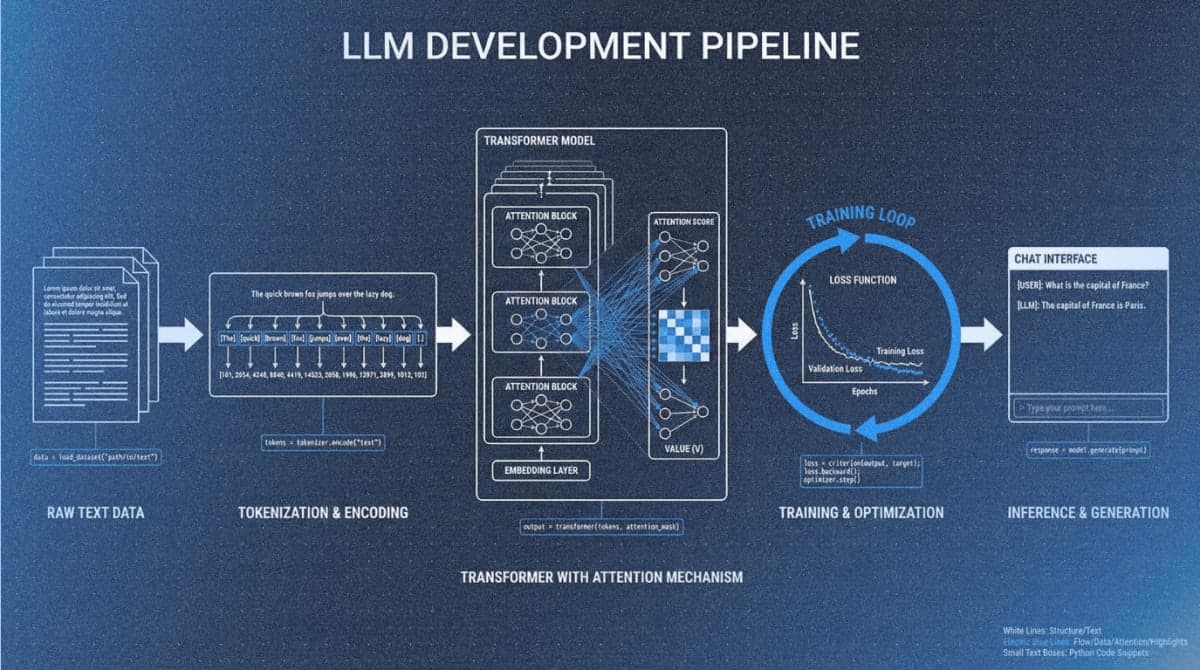
- Build the complete LLM pipeline: tokenization, attention mechanisms, pretraining, and finetuning
- Load pretrained weights from GPT-2 and Llama models
- Apply instruction finetuning and text classification techniques
GUIDE
This guide walks you through setting up Sebastian Raschka's LLMs-from-scratch repository and navigating its seven-chapter curriculum. You'll learn the environment requirements, chapter structure, and how to work through the material effectively. The guide assumes Python proficiency and targets developers who want to understand transformer architectures by building them.
Getting Started
The repository includes a comprehensive setup guide with OS-specific instructions.
Prerequisites Check
You need confident Python skills: classes, functions, NumPy operations. Neural network familiarity helps but isn't required (Appendix A covers PyTorch basics). Mathematical prerequisites include derivatives, chain rule concepts, and matrix multiplication.
Step 1: Clone the Repository
git clone --depth 1 https://github.com/rasbt/LLMs-from-scratch.git
cd LLMs-from-scratch
Expected result: Folders ch01 through ch07, appendix directories, and a setup folder.
Step 2: Create a Python Environment
python -m venv llm-env
source llm-env/bin/activate  # Windows: llm-env\Scripts\activate
Step 3: Install Dependencies
pip install -r requirements.txt
Installation takes 5-10 minutes. Packages include PyTorch, tiktoken, matplotlib, and numpy.
Step 4: Verify Your Setup
jupyter notebook ch02/01_main-chapter-code/ch02.ipynb
Run the first few cells. Successful execution confirms your environment works.
To check GPU availability:
import torch
print(torch.cuda.is_available())
The code uses GPU automatically when available but runs on CPU without modification.
Hardware Expectations
The main chapter code runs on conventional laptops. Training in Chapter 5 takes 1-2 hours on CPU, minutes on GPU. Bonus materials covering Llama 3.2 and Qwen3 benefit from GPU access.
Curriculum Structure
Each chapter builds on previous ones. Work through them sequentially.
Chapter 1: Understanding Large Language Models
Theory only, no code. Covers what LLMs are, how they differ from earlier NLP, and the architecture you'll implement. Read this even if you want to jump to code.
Chapter 2: Working with Text Data
Concepts: Tokenization, byte pair encoding, vocabulary building, training batches.
Main notebook: `ch02.ipynb`
You'll build a data loader that chunks text into training sequences. This component feeds every subsequent chapter.
Chapter 3: Coding Attention Mechanisms
Concepts: Self-attention, scaled dot-product attention, causal masking, multi-head attention.
Main notebook: `ch03.ipynb`
Summary reference: `multihead-attention.ipynb`
Chapter 4: Implementing a GPT Model from Scratch
Concepts: Transformer blocks, layer normalization, residual connections, model configuration.
Main notebook: `ch04.ipynb`
Clean implementation: `gpt.py`
Expected result: A complete untrained GPT model that accepts input tokens and produces output logits.
Chapter 5: Pretraining on Unlabeled Data
Concepts: Cross-entropy loss, training loops, learning rate scheduling, sampling strategies (temperature, top-k).
Main notebook: `ch05.ipynb`
This chapter includes loading pretrained GPT-2 weights from OpenAI, letting you skip expensive pretraining.
Chapter 6: Finetuning for Text Classification
Concepts: Classification heads, transfer learning, supervised dataset preparation.
Main notebook: `ch06.ipynb`
Uses spam detection as the example task.
Chapter 7: Finetuning to Follow Instructions
Concepts: Instruction datasets, chat formatting, evaluation strategies.
Main notebook: `ch07.ipynb`
Bonus: Direct Preference Optimization (DPO) implementation.
Appendices
- Appendix A: Introduction to PyTorch - Tensors, autograd, training basics. Start here if new to PyTorch.
- Appendix B: References and Further Reading - Curated links for deeper exploration.
- Appendix C: Exercise Solutions - Complete solutions index.
- Appendix D: Training Loop Improvements - Learning rate schedulers, gradient clipping.
- Appendix E: LoRA Finetuning - Parameter-efficient finetuning implementation.
Repository Navigation
Each chapter folder follows this structure:
ch0X/
├── 01_main-chapter-code/
│   ├── ch0X.ipynb          # Primary notebook
│   ├── exercise-solutions.ipynb
│   └── summary files
└── 02_bonus_*/             # Optional extensions
Start with the main notebook. Use summary files (.py scripts) as reference after understanding the material. Bonus folders contain advanced topics: alternative implementations, performance optimizations, and larger model ports.
Troubleshooting
Symptom: ModuleNotFoundError when importing chapter modules
Fix: Run Jupyter from the repository root directory with your virtual environment activated.
Symptom: CUDA out of memory error during training
Fix: Reduce batch size in the configuration dictionary. Alternatively, set device = 'cpu' to bypass GPU.
Symptom: Training loss stays flat or increases
Fix: Verify optimizer.zero_grad() is called before each backward pass. Print a few data loader batches to confirm correct data formatting.
Symptom: Generated text is random characters after training
Fix: Check that the same tokenizer instance is used for both training and generation. Verify the tokenizer encodes and decodes a test string correctly.
Symptom: CPU training takes hours
Fix: Expected behavior. Reduce training iterations for learning purposes, or use the pretrained weight loading approach in Chapter 5.
What's Next
After completing the main curriculum, explore the Llama 3.2 implementation, try LoRA finetuning, or continue to the sequel "Build a Reasoning Model (From Scratch)".
PRO TIPS
- Run
git pullperiodically; the repository receives regular updates and bug fixes - Use
Shift+Enterto execute cells sequentially in Jupyter; avoid running cells out of order - Set
torch.manual_seed(42)at the start of notebooks for reproducible results during debugging - Export trained models with
torch.save(model.state_dict(), 'model.pt')to avoid retraining - Use
nvidia-smi -l 1in a separate terminal to monitor GPU memory during training
COMMON MISTAKES
Skipping Chapter 1: The theory chapter establishes vocabulary and concepts referenced throughout. Skipping it creates confusion when terminology appears in code comments.
Running notebooks from wrong directory: Import statements assume you're in the repository root. Running from a subdirectory causes import failures.
Modifying code before understanding it: The notebooks are designed to work as-is. Make a copy before experimenting with architecture changes.
Ignoring the exercise solutions: The exercises reinforce understanding. Attempting them before checking solutions produces better retention than passive reading.
PROMPT TEMPLATES
Understanding Chapter Concepts
I'm working through Chapter [X] of "Build a Large Language Model From Scratch" and need clarification on [specific concept].

Here's the code I'm confused about:
[paste code]

Explain what this code does and how it fits into the overall GPT architecture.
Customize: Replace chapter number, specify the concept (causal masking, layer normalization, etc.), paste the actual code block.
Example output: For attention masking code, you'd receive an explanation of why future tokens must be masked during training, how the triangular matrix achieves this, and how it connects to autoregressive generation.
Debugging Training Issues
My GPT training from Chapter 5 shows [specific problem].

Configuration:
- Batch size: [X]
- Learning rate: [X]
- Device: [CPU/GPU]

Training loop code:
[paste code]

What's causing this and how do I fix it?
Extending the Implementation
I've completed Chapter [X] and want to add [specific modification].

Current implementation:
[paste relevant code section]

What changes are needed and what might break?
FAQ
Q: Is the GitHub repository sufficient, or do I need the book?
A: The repository contains all code with substantial notebook explanations. The book adds context and structured prose. Many complete the curriculum using only the repository.
Q: Can I run this on Google Colab?
A: Yes. Upload notebooks or clone to Google Drive. Colab's free GPU handles all main chapter code.
Q: How does this compare to Andrej Karpathy's "Let's build GPT" video?
A: Karpathy's video covers similar ground faster (2 hours). Raschka's material is more comprehensive with book-length explanations and exercises. They complement each other well.
Q: What if I get stuck?
A: Check the chapter's exercise solutions, then search GitHub Discussions. The Manning forum is also active.
Q: When can I build something practical?
A: After Chapter 5 (20-30 hours), you can generate text. After Chapter 7, you can finetune for specific tasks.
Q: Can someone without a CS degree complete this?
A: Yes, given Python proficiency. The material is self-contained and explains concepts as they appear.
RESOURCES
- Official GitHub Repository: All code, notebooks, bonus materials
- Manning Book Page: Print and ebook versions
- 17-Hour Video Course: Companion video coding through each chapter
- GitHub Discussions: Community Q&A
- Free Quiz PDF: 30 questions per chapter for self-assessment
- Reasoning From Scratch: Sequel repository covering advanced reasoning techniques