QUICK INFO
| Difficulty | Beginner to Intermediate |
| Time Required | 2-40 hours per course |
| Prerequisites | Basic Python knowledge for most; some courses require none |
| Tools Needed | Hugging Face account, Google Cloud account (free tier), GitHub account |
What You'll Learn:
- Build AI agents from scratch using Python and established frameworks
- Implement tool-calling, memory, and multi-agent orchestration
- Deploy agents to production environments
- Earn certificates to verify your skills
This guide covers five free courses for learning AI agents: Hugging Face, LangChain Academy, Microsoft Learn, Google Cloud, and DeepLearning.AI. Each takes a different approach, and not all of them are equally useful depending on what you're trying to accomplish.
I've pulled together course structures, prerequisites, and what you'll actually build. Some courses offer certificates; others just give you the knowledge. The trade-offs are worth understanding before you commit 20+ hours to any of them.
Understanding What These Courses Cover
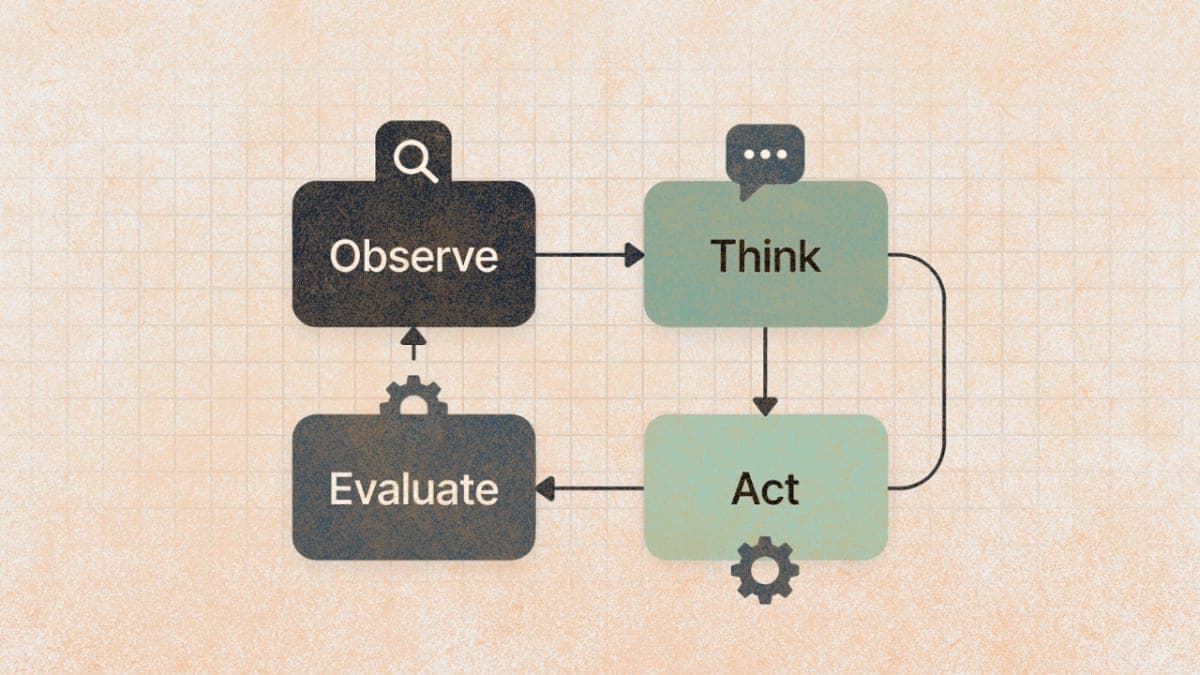
AI agents aren't just chatbots. They're systems where the model decides what actions to take, executes those actions through tools, and iterates based on what it learns. The courses below teach different frameworks for building these systems, including smolagents, LangGraph, LlamaIndex, and Azure AI Foundry.
The frameworks differ significantly in philosophy. LangGraph emphasizes explicit control over agent behavior through state graphs. Smolagents from Hugging Face focuses on code-generating agents that write and execute Python. Azure AI Foundry provides managed infrastructure with less framework lock-in. Understanding these differences matters because the framework you learn first tends to shape how you think about agent architecture.
Course 1: Hugging Face Agents Course
URL: https://huggingface.co/learn/agents-course
Time commitment: 15-25 hours across 4 units plus bonus content
Certificate: Yes, two options (Fundamentals or Full Completion)
This course launched in early 2025 and quickly became one of the more comprehensive free options. It's structured into four main units: an introduction to agent fundamentals, deep dives into three frameworks (smolagents, LlamaIndex, and LangGraph), agentic RAG implementations, and a final benchmark challenge using GAIA.
The interesting part is the breadth. Most agent courses pick one framework and stick with it. Hugging Face teaches three, which gives you a basis for comparison. You'll implement the same concepts in different ways and start to see where each framework excels.
What You'll Actually Build
Unit 1 covers the basics: what agents are, how LLMs interact with tools, and the observation-thought-action loop. By the end, you'll have built a simple agent in Python without any framework.
Unit 2 is where things get practical. In smolagents, you'll build code-generating agents that write Python to accomplish tasks. LlamaIndex focuses on document retrieval and structured data access. LangGraph teaches state machines for controlling agent flow.
Unit 3 applies everything to retrieval-augmented generation (RAG). Unit 4 puts you against the GAIA benchmark, which is a standardized test for measuring agent capability.
The bonus units cover fine-tuning models for function calling and observability/evaluation. These are the sections that felt most production-relevant to me, though they're technically optional.
Prerequisites and Gotchas
You need a Hugging Face account and basic Python knowledge. The course expects familiarity with concepts like APIs and asynchronous code, though it explains most things as it goes.
One reviewer noted that the final project for certification was the most demanding part. The GAIA benchmark isn't easy, and getting an agent to perform well requires genuine debugging and iteration. This isn't a course you can click through in an afternoon.
Getting Started
- Go to https://huggingface.co/learn/agents-course
- Create a Hugging Face account if you don't have one
- Join the Hugging Face Discord for support (linked on the course page)
- Start with Unit 0 for setup instructions
The course is maintained by Ben Burtenshaw and Sergio Paniego. The Discord channel is active if you get stuck.
Course 2: LangChain Academy - Introduction to LangGraph
URL: https://academy.langchain.com/courses/intro-to-langgraph
Time commitment: 4-8 hours
Certificate: Skill badge upon completion
LangGraph is LangChain's framework for building agents with explicit control over their behavior. Unlike smolagents (which lets agents generate arbitrary code), LangGraph defines agents as state machines with nodes, edges, and conditional routing.
The Academy offers several LangGraph courses. "Introduction to LangGraph" covers fundamentals. There's also "LangGraph Essentials" which builds an email workflow, and more advanced project courses for deep research and ambient agents.
The Framework Philosophy
LangGraph treats agent behavior as a graph. Nodes are actions (like calling an LLM or executing a tool). Edges define the flow between nodes. Conditional edges let the agent decide which path to take based on state.
This explicitness has trade-offs. You have more control than with code-generating agents, but you also have to think harder about the structure upfront. For production applications where reliability matters more than flexibility, this tends to be the right trade-off.
The course teaches state management, memory (both short and long-term), human-in-the-loop patterns, and how to build agents that can pause and resume. These are the features that distinguish toy demos from actual deployable systems.
What You'll Build
The introductory course walks through building a basic agent, adding tools, implementing memory, and handling conditional logic. Later courses build complete applications: an email assistant (Ambient Agents), a research agent (Deep Research), and a multi-agent system (Deep Agents).
Harrison Chase, LangChain's founder, teaches several of these courses. The instruction quality is solid, though some users report the platform itself can be finicky with lab environments.
Getting Access
- Visit https://academy.langchain.com
- Create an account
- Enroll in "Introduction to LangGraph" (free)
- Additional courses are also free but may require completing prerequisites
LangGraph is MIT-licensed and free to use. The Academy courses are free. LangSmith (for deployment and monitoring) has a free tier with usage limits.
Course 3: Microsoft Learn - Develop AI Agents on Azure
URL: https://learn.microsoft.com/en-us/training/paths/develop-ai-agents-on-azure/
Time commitment: 8-15 hours
Certificate: Microsoft Learn badge; also available as a Coursera Professional Certificate with paid option
Microsoft's approach differs from the open-source frameworks. Azure AI Foundry (formerly Azure AI Agent Service) provides managed infrastructure for building and deploying agents. You're less locked into a specific framework and more focused on using Azure's services together.
The learning path covers six modules: agent fundamentals, building agents with Azure AI Foundry, custom tools, multi-agent systems, Model Context Protocol (MCP) integration, and the Microsoft Agent Framework SDK.
Framework Independence
Azure AI Foundry supports multiple agent frameworks. You can use Semantic Kernel (Microsoft's SDK), AutoGen, or bring your own framework. The course teaches you to think about agents at a higher level of abstraction: what capabilities do you need, which services provide them, and how do they connect?
This is genuinely different from learning LangGraph or smolagents. You're learning to compose Azure services (Chat, Language, Vision, Speech, Search) into agent systems rather than implementing low-level agent loops yourself.
What You'll Build
The Microsoft path includes a hotel information agent that handles guest inquiries using multiple AI services. Later modules add multi-agent orchestration and MCP tool integration.
Microsoft also has a separate GitHub repo, "AI Agents for Beginners" (12 lessons), which covers more of the theory and includes Python code samples. That's at https://microsoft.github.io/ai-agents-for-beginners/ and is completely free without needing Azure credits.
Prerequisites and Costs
The Microsoft Learn modules are free. The hands-on labs require an Azure account. New Azure accounts get $200 in credits, which is enough to complete the course if you're careful about shutting down resources.
If you want more structured learning with instructor support, Microsoft offers a Coursera Professional Certificate ("Microsoft AI Agents: From Foundations to Applications") that includes the same content plus additional projects. That requires Coursera subscription or financial aid.
Getting Started
- Create a Microsoft Learn account at https://learn.microsoft.com
- Navigate to the learning path
- Set up an Azure account if you want to do hands-on labs
- Alternatively, start with the GitHub "AI Agents for Beginners" repo for free learning without Azure
Course 4: Google Cloud - Generative AI Learning Path
URL: https://www.cloudskillsboost.google/paths/118 (Introduction to Generative AI)
Time commitment: Varies (path 118 is ~2 hours; agent-specific content is 8-15 hours)
Certificate: Google Cloud skill badges
Google's AI agent training is distributed across multiple learning paths on Google Skills (formerly Google Cloud Skills Boost). The specific path mentioned in your list (path 118) is actually an introductory generative AI overview, not an agent-specific course.
For AI agents specifically, look for courses like "Build Generative AI Agents with Vertex AI and Flutter" on Coursera, or labs like "Deploy an Agent with Agent Development Kit" on Google Skills.
The Google Ecosystem
Vertex AI Agent Builder is Google's platform for building agents. It's a no-code/low-code tool that lets you define agent behavior, connect to data sources, and deploy. The Agent Development Kit (ADK) provides more programmatic control for developers.
Google recently launched the Gemini Enterprise Agent Ready (GEAR) program aimed at training one million developers on their agentic platform. This includes skill badges through Google Skills.
Getting Access
Google Cloud Innovators (free program) get 35 monthly credits for Google Skills labs. That's enough to complete most agent-focused content without paying.
- Join Google Cloud Innovators at https://cloud.google.com/innovators
- Access Google Skills at https://www.skills.google
- Search for "agent" or "Vertex AI Agent Builder" to find relevant courses
- Coursera also hosts Google Cloud courses; some are free to audit
One limitation: the Google ecosystem changes faster than the documentation. Courses from mid-2024 may reference services or interfaces that have since been updated. Check the "last updated" dates on any course before starting.
Course 5: DeepLearning.AI - AI Agents in LangGraph
URL: https://www.deeplearning.ai/short-courses/ai-agents-in-langgraph/
Time commitment: 2-4 hours
Certificate: Yes, DeepLearning.AI certificate
This is the shortest course on the list but possibly the most focused. Andrew Ng's DeepLearning.AI partnered with LangChain and Tavily to create a concentrated introduction to LangGraph.
Harrison Chase (LangChain) and Rotem Weiss (Tavily) co-teach. The course is free during DeepLearning.AI's beta period, though that could change.
What It Covers
You'll build an agent from scratch in Python first, then rebuild it using LangGraph. The contrast is instructive: you see what the framework abstracts away and what control you gain from using it.
The course emphasizes agentic search (using Tavily), persistence (storing state across conversations), and human-in-the-loop patterns. The final project builds an essay-writing agent that researches, drafts, and refines content.
Related DeepLearning.AI Courses
DeepLearning.AI offers several other free agent courses. "Multi-AI Agent Systems with CrewAI" teaches multi-agent orchestration. "Long-Term Agentic Memory with LangGraph" goes deeper on memory systems. All are short (1-4 hours) and focused.
These courses assume intermediate Python knowledge. They move fast and don't spend time on basics.
Getting Started
- Go to https://www.deeplearning.ai/short-courses/ai-agents-in-langgraph/
- Create a DeepLearning.AI account
- Courses include Jupyter notebooks you can run directly in the browser
Choosing Your Path
The five courses serve different needs. If you want breadth and comparison across frameworks, Hugging Face is the most comprehensive. If you want to go deep on one framework with production patterns, LangChain Academy is more focused. Microsoft and Google courses make sense if you're already in those cloud ecosystems. DeepLearning.AI is the fastest way to get a working understanding of LangGraph specifically.
I'd suggest starting with either the Hugging Face course (for breadth) or the DeepLearning.AI LangGraph course (for speed). You can complete the DeepLearning.AI course in a weekend, which gives you enough context to decide whether to invest more time in LangGraph specifically or explore other frameworks.
One thing these courses don't cover well: evaluation and testing of agent systems. Agents are notoriously difficult to test because their behavior is non-deterministic. Some courses mention LangSmith or Weights & Biases for observability, but rigorous testing strategies are still an open problem the industry hasn't solved.
Troubleshooting
Lab environment not loading in LangChain Academy Try a different browser. Chrome works most reliably. If you're using a VPN, disable it temporarily.
Hugging Face course certificate not appearing Certificates require completing all required assignments, not just viewing content. Check your completion percentage on each unit. The GAIA benchmark submission is required for the full certificate.
Azure credits running low Delete resource groups immediately after completing each lab. The biggest cost is leaving compute resources running. Set up budget alerts in Azure to warn you before you hit limits.
Google Skills courses show "requires credits" when you expected free Make sure you're signed in with your Innovators account. Some courses require specific skill badges as prerequisites before they unlock for free.
What's Next
After completing one or two of these courses, you'll understand the basics of agent architecture. The next step is building something real.
For practical projects, the Hugging Face course's Pokemon battle agent (Bonus Unit 3) is genuinely fun. LangChain Academy's email assistant course ("Ambient Agents") builds something you might actually use.
If you want to go deeper on multi-agent systems, look at CrewAI or AutoGen. Both have free courses and documentation. The patterns you learned from LangGraph transfer reasonably well, though the syntax differs.
PRO TIPS
The keyboard shortcut for restarting a Jupyter kernel (common in these courses when you hit a bug) is 0, 0 in command mode. You'll use this a lot.
When debugging agents, add print statements after every tool call. Agents fail in ways that aren't obvious from error messages alone. Seeing the actual tool inputs and outputs usually reveals the problem.
For LangGraph specifically, the draw_mermaid_png() method on any graph object renders a visual diagram. This is invaluable when your agent isn't taking the path you expect.
If you're doing multiple courses, keep a notes file tracking which frameworks use which terminology. "Tools" vs "functions" vs "actions" mean slightly different things in different contexts. The conceptual overlap is high but the vocabulary inconsistency is frustrating.
FAQ
Q: Do I need to pay for API calls while taking these courses? A: Most courses provide sandboxed environments with included API access. The exceptions are when you build projects outside the course environment. Hugging Face Inference API has a free tier. OpenAI and Anthropic require paid API keys for significant usage.
Q: Which course should I take first if I've never built an AI agent? A: DeepLearning.AI's LangGraph course or Hugging Face Unit 1. Both start from fundamentals. The DeepLearning.AI course is faster; Hugging Face is more thorough.
Q: Are these certificates actually valued by employers? A: Certificates from these courses demonstrate familiarity, not expertise. They're most valuable for people transitioning into AI roles who need to show intentional skill-building. For experienced developers, a GitHub repo with working agent code matters more than certificates.
Q: Can I complete these courses on mobile? A: You can watch videos and read content on mobile, but the hands-on labs require a laptop. Most labs involve writing and running Python code in Jupyter notebooks.
Q: Do I need a GPU for these courses? A: No. All courses use API-based access to models. You'll call hosted models, not run them locally.
RESOURCES
- Hugging Face Agents Course: Main course page with Discord link for support
- LangChain Academy: All LangGraph courses including advanced projects
- Microsoft AI Agents for Beginners (GitHub): 12 free lessons, no Azure account required
- Google Skills: Search "agent" for current AI agent courses
- DeepLearning.AI Short Courses: All agent-related courses including CrewAI and memory courses
- LangGraph Documentation: Reference docs beyond what courses cover