QUICK INFO
| Difficulty | Intermediate |
| Time Required | 1-2 weeks (core loop: ~1 week) |
| Prerequisites |
|
| Tools Needed |
|
What You'll Learn:
- Architect a proposal-to-execution loop where agents operate without manual intervention
- Fix the three most common pitfalls that make multi-agent systems stall silently
- Implement cap gates, triggers, and a reaction matrix for inter-agent coordination
- Add self-healing via stale step recovery so the system survives crashes
This guide walks you through the gap between "AI agents that can talk" and "AI agents that run things end-to-end." It is aimed at developers who already have OpenClaw on a VPS, a Next.js frontend on Vercel, and Supabase as their database, and who now need those pieces to form an autonomous loop. If you do not have that stack running yet, set it up first; this is not a getting-started guide for any of those tools individually.
Getting Started
The core problem is deceptively simple. OpenClaw gives your agents cron jobs, tool use, roundtable discussions, and scheduled tasks. Your agents can produce outputs: drafted tweets, research reports, content proposals. But nothing in that default setup turns output into execution, and nothing tells the system "done" after execution completes. Between "agents can produce output" and "agents run things" sits a full closed loop you have to build yourself.
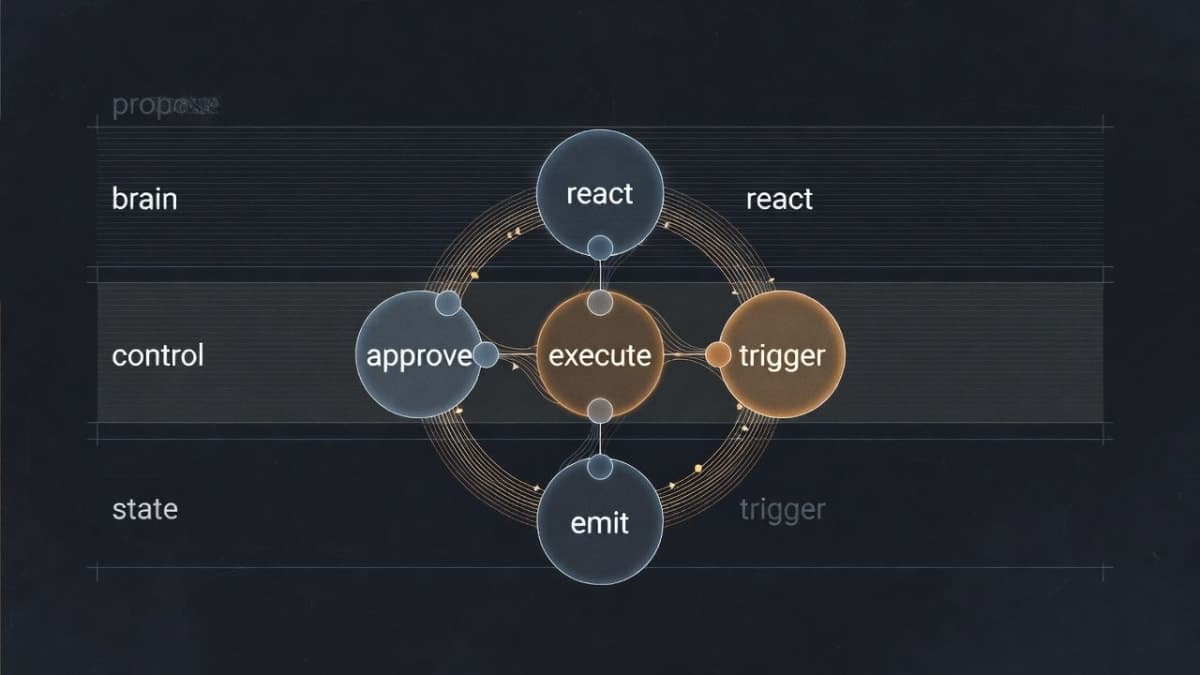
The loop looks like this: an agent proposes an idea, that proposal gets checked against approval rules, a mission with executable steps gets created, a worker claims and runs those steps, an event gets emitted, and triggers or reactions fire new proposals based on what just happened. Then the cycle repeats. Each stage feeds the next, and if any link breaks, the system either stalls or spirals.
You need eight Supabase tables at minimum: ops_mission_proposals for proposals, ops_missions for approved missions, ops_mission_steps for executable steps, ops_agent_events for the event stream, ops_policy for configuration stored as JSON, ops_trigger_rules for trigger definitions, ops_agent_reactions for the reaction queue, and ops_action_runs for execution logs. Create these before writing any application code. Supabase is the single source of truth; everything reads from and writes to these tables.
The Three Pitfalls That Stall Your Loop
Once you have the tables and a basic proposal flow, things will appear to work. Agents propose, proposals get approved, missions get created. Then you notice the system is "spinning in place," doing work but not completing anything meaningful. These three problems are what you will hit.
Two Executors Fighting Over the Same Work
If your VPS has OpenClaw workers claiming tasks from ops_mission_steps, and your Vercel heartbeat cron is also running a mission-worker process, both will grab the same step. The result is race conditions, conflicting status updates, and occasional silent data corruption.
The fix is straightforward: pick one executor. The VPS handles all step execution. Vercel runs only the lightweight control plane: evaluating triggers, processing the reaction queue, promoting insights, and cleaning up stuck tasks. Remove any runMissionWorker call from your heartbeat route.
// Heartbeat now does only 4 things
const triggerResult = await evaluateTriggers(sb, 4_000);
const reactionResult = await processReactionQueue(sb, 3_000);
const learningResult = await promoteInsights(sb);
const staleResult = await recoverStaleSteps(sb);
This separation also means you do not need Vercel Pro for cron. A single crontab line on your VPS hitting the heartbeat endpoint every 5 minutes works fine:
*/5 * * * * curl -s -H "Authorization: Bearer $KEY" https://yoursite.com/api/ops/heartbeatProposals Created But Never Executed
This one was confusing to debug. Triggers would correctly detect a condition (say, a tweet going viral) and insert a row into ops_mission_proposals. But the proposal would sit at pending forever, never becoming a mission, never generating steps.
The problem: triggers were inserting proposals directly into the table, bypassing the approval flow. The normal path is insert proposal, evaluate auto-approve rules, and if approved, create the mission with its steps. Triggers skipped steps two and three.
The fix is a single shared function, something like createProposalAndMaybeAutoApprove, that every proposal source must call. API endpoints, triggers, reactions: all of them go through this one function. It handles daily limits, cap gates (more on those next), proposal insertion, event emission, auto-approval evaluation, and mission creation.
// proposal-service.ts
export async function createProposalAndMaybeAutoApprove(
  sb: SupabaseClient,
  input: ProposalServiceInput,
): Promise<ProposalServiceResult> {
  // 1. Check daily limit
  // 2. Check cap gates
  // 3. Insert proposal
  // 4. Emit event
  // 5. Evaluate auto-approve
  // 6. If approved: create mission + steps
  // 7. Return result
}
Triggers then just return a proposal template. The evaluator feeds it into the shared service. Any future logic (rate limits, blocklists, new caps) changes in one file.
Queue Buildup When Quotas Are Full
The sneakiest one. No errors in the logs. Everything looks clean. But your ops_mission_steps table has hundreds of queued steps piling up, and nothing is processing them.
What happens: your tweet quota is full, but proposals are still being approved and generating missions and steps. The VPS worker sees the quota is full, skips the step without claiming it, and does not mark it as failed either. Next cycle, another batch arrives.
The fix is cap gates, which reject at the proposal entry point. If a proposal would generate steps that cannot be executed (because a quota is full, a feature is disabled, or a policy blocks it), reject the proposal before it creates any queued steps.
async function checkPostTweetGate(sb: SupabaseClient) {
  const autopost = await getOpsPolicyJson(sb, 'x_autopost', {});
  if (autopost.enabled === false)
    return { ok: false, reason: 'x_autopost disabled' };

  const quota = await getOpsPolicyJson(sb, 'x_daily_quota', {});
  const limit = Number(quota.limit ?? 10);
  const { count } = await sb
    .from('ops_tweet_drafts')
    .select('id', { count: 'exact', head: true })
    .eq('status', 'posted')
    .gte('posted_at', startOfTodayUtcIso());

  if ((count ?? 0) >= limit)
    return { ok: false, reason: `Daily tweet quota (${count}/${limit})` };
  return { ok: true };
}
Each step kind (write_content, post_tweet, deploy) gets its own gate function. Rejected proposals are recorded for auditing, not silently dropped. The key principle: reject at the gate, not in the queue.
Triggers and the Reaction Matrix
With the three pitfalls fixed, the loop runs clean. But it only does what you explicitly schedule. To make it responsive, you need triggers (system reacts to conditions) and reactions (agents respond to each other).
Triggers are condition-action rules stored in your database. A trigger checks for something specific, like tweet engagement exceeding 5% or a mission failing, and returns a proposal template that goes through the standard proposal service. Four built-in triggers cover most cases: analyzing viral tweets, diagnosing mission failures, reviewing newly published content, and promoting mature insights to permanent memory. Each trigger needs a cooldown period. Without it, one viral tweet fires an analysis proposal on every 5-minute heartbeat cycle.
The reaction matrix is more interesting, and I should clarify that it is less "matrix" and more "pattern-matching config." It lives as JSON in the ops_policy table and defines probabilistic inter-agent responses.
{
  "patterns": [
    { "source": "twitter-alt", "tags": ["tweet","posted"],
      "target": "growth", "type": "analyze",
      "probability": 0.3, "cooldown": 120 },
    { "source": "*", "tags": ["mission:failed"],
      "target": "brain", "type": "diagnose",
      "probability": 1.0, "cooldown": 60 }
  ]
}
When Agent X posts a tweet, there is a 30% chance Agent Y analyzes its performance. When any mission fails, there is a 100% chance the diagnostic agent kicks in. The probability is intentional, not a bug. Full determinism makes the system feel mechanical. Some randomness makes it feel like a team where people sometimes respond and sometimes do not. Whether that matters to you depends on whether your agents are public-facing or purely backend infrastructure. For backend work, you probably want 1.0 everywhere.
Self-Healing
VPS restarts, API timeouts, network blips. Steps get stuck in running status with no process actually handling them. The heartbeat includes a recovery function that marks any step stuck for over 30 minutes as failed, then checks whether the parent mission should be finalized.
const STALE_THRESHOLD_MS = 30 * 60 * 1000;

const { data: stale } = await sb
  .from('ops_mission_steps')
  .select('id, mission_id')
  .eq('status', 'running')
  .lt('reserved_at', staleThreshold);

for (const step of stale) {
  await sb.from('ops_mission_steps').update({
    status: 'failed',
    last_error: 'Stale: no progress for 30 minutes',
  }).eq('id', step.id);
  await maybeFinalizeMissionIfDone(sb, step.mission_id);
}
maybeFinalizeMissionIfDone checks all steps in a mission. If any step failed, the mission fails. All completed means success. Without this, you get a subtle bug where one step succeeds and the mission gets marked as success while other steps are still hanging.
Policy-Driven Configuration
Do not hardcode limits. Every behavioral toggle goes in the ops_policy table as a JSON document. Auto-approve rules, daily quotas, which step kinds are allowed to execute, whether Vercel should run workers (set to false). Adjust any policy without redeploying code. This was one of those decisions that felt like overkill during initial development but paid off within the first week of operation. Being able to disable tweet posting by changing one JSON value while debugging a formatting issue is worth the abstraction cost.
Troubleshooting
Symptom: Proposals show pending status and never progress.
Fix: Check that whatever created the proposal is calling the shared proposal service, not inserting directly into the table. Also verify auto-approve policy exists in ops_policy and that the step kinds in the proposal match the allowed_step_kinds array.
Symptom: Steps pile up in queued status, worker logs show no errors.
Fix: The worker is likely skipping steps because a quota or policy check fails silently. Add cap gates to reject proposals before they generate steps. Check whether the relevant policy (like x_daily_quota) is set correctly.
Symptom: Duplicate step executions or conflicting status updates.
Fix: You have two executors claiming work. Verify that Vercel's heartbeat route does not include runMissionWorker. Only the VPS should claim and run steps.
Symptom: Triggers fire but produce no visible result.
Fix: Check cooldown periods. If a trigger fired recently and the cooldown has not elapsed, subsequent detections are silently skipped. Also check that the trigger's proposal template includes valid step kinds that pass cap gates.
What Comes Next
The full loop (propose, approve, execute, emit event, trigger reaction) takes roughly a week to wire up once you have the underlying infrastructure. From there, the next challenge is inter-agent collaboration: roundtable voting, memory consolidation, and making multiple LLM instances act like a team rather than six isolated processes. That is a different problem entirely, and one where I am still iterating.