QUICK INFO
| Difficulty | Intermediate |
| Time Required | 45-60 minutes |
| Prerequisites | Python 3.9+, familiarity with async/await, basic understanding of LLM prompting |
| Tools Needed | OpenAI API key, openai-agents library (pip install openai-agents) |
What You'll Learn:
- Structure a state object that separates profile data from memory notes
- Capture user preferences in real-time using a dedicated memory tool
- Consolidate session notes into long-term memory without duplicates or conflicts
- Inject memory into prompts with clear precedence rules
This guide walks through OpenAI's context personalization cookbook, which shipped in early January 2026. The approach uses structured state objects instead of retrieval-based memory. No embeddings, no semantic search. You maintain a JSON object locally, inject relevant portions into the system prompt, and let the agent reason over it directly.
The pattern works well for agents where continuity matters: travel booking, customer support, personal assistants. It's less suited for knowledge-heavy applications where you need to search through thousands of documents.
How This Differs from RAG-Based Memory
Most memory implementations for LLMs involve embedding past conversations, storing them in a vector database, and retrieving relevant chunks at runtime. OpenAI's cookbook takes a different path entirely.
Instead of treating memory as a retrieval problem, the pattern treats it as state management. You maintain a single JSON object with two main sections: a structured profile (hard facts like loyalty status, preferences, IDs) and unstructured notes (freeform observations like "prefers hotels in walkable neighborhoods").
The advantages: deterministic behavior, no retrieval failures, clear precedence rules when memories conflict. The tradeoffs: you're limited to what fits in the context window, and you need explicit logic to decide what gets remembered.
The Core Architecture
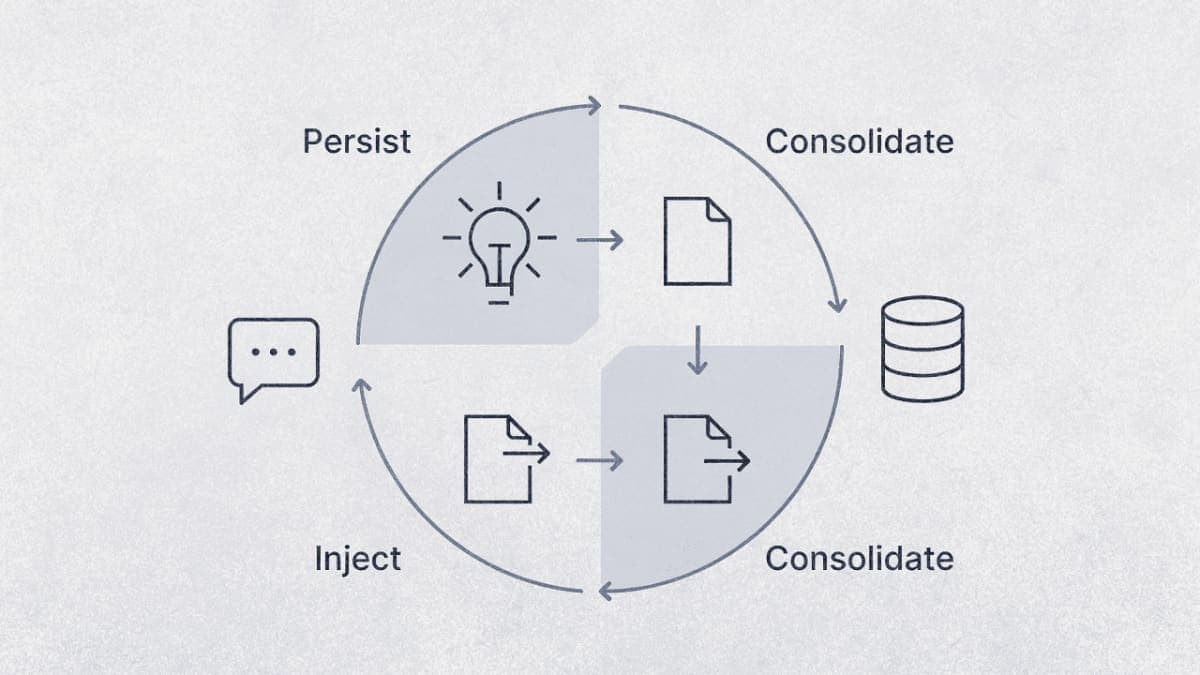
The memory lifecycle has four phases that repeat each session:
Injection happens at session start. The state object gets rendered into the system prompt, with profile data formatted as YAML frontmatter and memory notes as Markdown lists.
Distillation happens during the conversation. When the user reveals a preference ("I'm vegetarian"), the agent calls a save_memory_note tool to capture it as a session note.
Consolidation happens after the session ends. A separate LLM call merges session notes into global memory, handling deduplication and conflict resolution.
Persistence is your responsibility. The cookbook stores state locally. In production, you'd write this to a database keyed by user ID.
Step 1: Define Your State Object
The state object is a Python dataclass with four main sections. Profile holds structured data that rarely changes. Global memory stores long-term preferences. Session memory captures notes from the current conversation. Trip history (in the cookbook's travel example) provides recent behavioral context.
from dataclasses import dataclass, field
from typing import Any, Dict, List

@dataclass
class MemoryNote:
    text: str
    last_update_date: str  # ISO format: YYYY-MM-DD
    keywords: List[str]

@dataclass
class AgentState:
    profile: Dict[str, Any] = field(default_factory=dict)
    global_memory: Dict[str, Any] = field(default_factory=lambda: {"notes": []})
    session_memory: Dict[str, Any] = field(default_factory=lambda: {"notes": []})

    # Rendered strings for injection (computed each run)
    system_frontmatter: str = ""
    global_memories_md: str = ""
    session_memories_md: str = ""
The cookbook initializes this with realistic travel data: loyalty IDs, seat preferences, past trip patterns. In your implementation, you'd hydrate the profile section from your user database or CRM.
One thing I noticed while testing: the last_update_date field on notes is important for conflict resolution later. The consolidation step uses it to decide which version of a preference wins when two notes contradict each other.
Step 2: Build the Memory Capture Tool
The agent needs a way to record preferences as they surface in conversation. The cookbook implements this as a function tool that writes to session_memory.notes.
from agents import function_tool, RunContextWrapper
from datetime import datetime, timezone

@function_tool
def save_memory_note(
    ctx: RunContextWrapper[AgentState],
    text: str,
    keywords: List[str],
) -> dict:
    """
    Save a candidate memory note into session storage.

    Only capture durable, actionable preferences explicitly stated by the user.
    Do not store speculation, sensitive PII, or temporary trip-specific details.
    """
    if ctx.context.session_memory.get("notes") is None:
        ctx.context.session_memory["notes"] = []

    clean_keywords = [k.strip().lower() for k in keywords if k.strip()][:3]

    ctx.context.session_memory["notes"].append({
        "text": text.strip(),
        "last_update_date": datetime.now(timezone.utc).strftime("%Y-%m-%d"),
        "keywords": clean_keywords,
    })

    return {"ok": True}
The tool docstring does most of the work here. It tells the model what counts as a good memory (durable, actionable, explicit) and what to skip (speculation, sensitive data, temporary context). The cookbook's version is more detailed, with specific examples for each category.
Expected result: When a user says "I'm vegetarian," the agent should call this tool with something like text="Prefers vegetarian meal options" and keywords=["dietary"].
Step 3: Render State for Injection
Before each agent run, you need to convert the state object into strings that can be inserted into the system prompt. The cookbook uses YAML for structured profile data and Markdown lists for memory notes.
import yaml

def render_frontmatter(profile: dict) -> str:
    payload = {"profile": profile}
    y = yaml.safe_dump(payload, sort_keys=False).strip()
    return f"---\n{y}\n---"

def render_memories_md(notes: list[dict], k: int = 6) -> str:
    if not notes:
        return "- (none)"
    # Sort by date, most recent first
    notes_sorted = sorted(notes, key=lambda n: n.get("last_update_date", ""), reverse=True)
    return "\n".join([f"- {n['text']}" for n in notes_sorted[:k]])
The k parameter limits how many notes get injected. This is your main lever for controlling token usage. Six notes worked well in the cookbook's travel agent; you might need more or fewer depending on your use case.
Step 4: Set Up the Injection Hook
The OpenAI Agents SDK provides lifecycle hooks that run at specific points during agent execution. The on_start hook fires before the agent begins processing, which is where you inject memory into the context.
from agents import AgentHooks, Agent

class MemoryHooks(AgentHooks[AgentState]):
    async def on_start(self, ctx: RunContextWrapper[AgentState], agent: Agent) -> None:
        ctx.context.system_frontmatter = render_frontmatter(ctx.context.profile)
        ctx.context.global_memories_md = render_memories_md(
            ctx.context.global_memory.get("notes", [])
        )
The cookbook also handles a flag called inject_session_memories_next_turn that gets set when context trimming occurs. This ensures session notes survive if the conversation history gets truncated.
Step 5: Write the Memory Policy Prompt
This is where you tell the model how to interpret injected memories. The cookbook wraps this in XML-style tags and includes explicit precedence rules.
MEMORY_POLICY = """
<memory_policy>
You may receive two memory lists:
- GLOBAL memory = long-term defaults ("usually / in general")
- SESSION memory = trip-specific overrides ("this trip / this time")

Precedence and conflicts:
1) The user's latest message overrides everything
2) SESSION memory overrides GLOBAL memory when they conflict
3) Within the same list, prefer the most recent by date
4) Treat GLOBAL memory as defaults, not hard constraints

When to ask a clarifying question:
- Only if memory materially affects booking and intent is ambiguous
- Ask one focused question, not multiple

Safety:
- Never store or echo sensitive PII
- If memory seems stale or conflicts with user intent, defer to the user
</memory_policy>
"""
The precedence rules matter. Without them, the agent might cling to an old preference even when the user explicitly requests something different. "I usually want aisle seats" shouldn't override "give me a window seat this time."
Step 6: Assemble the Dynamic Instructions
The agent's instructions get built dynamically each run, pulling in the rendered state and memory policy.
async def instructions(ctx: RunContextWrapper[AgentState], agent: Agent) -> str:
    s = ctx.context

    base = """You are a concise, reliable travel concierge.
Help users plan flights, hotels, and car rentals.
Ask only one clarifying question at a time.
Never invent prices or availability—state uncertainty if needed."""

    return (
        base
        + "\n\n<user_profile>\n" + s.system_frontmatter + "\n</user_profile>"
        + "\n\n<memories>\nGLOBAL memory:\n" + s.global_memories_md + "\n</memories>"
        + "\n\n" + MEMORY_POLICY
    )
Step 7: Implement Post-Session Consolidation
After the session ends, you need to merge session notes into global memory. This is the trickiest part of the system because it can introduce errors: duplicate memories, lost information, or hallucinated facts.
The cookbook handles this with another LLM call that receives both note lists and outputs a merged result.
import json

def consolidate_memory(state: AgentState, client, model: str = "gpt-4o-mini") -> None:
    session_notes = state.session_memory.get("notes", [])
    if not session_notes:
        return

    global_notes = state.global_memory.get("notes", [])

    prompt = f"""
    Consolidate these memory notes into long-term storage.

    RULES:
    1) Keep only durable preferences and constraints
    2) Drop session-only notes (phrases like "this time", "this trip")
    3) Deduplicate: remove exact and near-duplicates
    4) Conflicts: keep the most recent by last_update_date
    5) Do NOT invent new facts

    Return ONLY a valid JSON array with objects containing:
    {{"text": string, "last_update_date": "YYYY-MM-DD", "keywords": [string]}}

    GLOBAL_NOTES: {json.dumps(global_notes)}
    SESSION_NOTES: {json.dumps(session_notes)}
    """

    resp = client.responses.create(model=model, input=prompt)

    try:
        consolidated = json.loads(resp.output_text.strip())
        if isinstance(consolidated, list):
            state.global_memory["notes"] = consolidated
    except Exception:
        # Fallback: simple append if parsing fails
        state.global_memory["notes"] = global_notes + session_notes

    state.session_memory["notes"] = []
The fallback behavior is important. If the consolidation model returns malformed JSON (which happens occasionally), you don't want to lose the session notes entirely. Appending them raw is better than dropping them.
Putting It Together
Here's how a typical session flows:
from agents import Agent, Runner

# Initialize state (in production, load from database)
state = AgentState(
    profile={"name": "John", "loyalty_status": "Gold", "seat_preference": "aisle"},
    global_memory={"notes": [
        {"text": "Prefers aisle seats", "last_update_date": "2024-06-25", "keywords": ["seat"]}
    ]}
)

agent = Agent(
    name="Travel Concierge",
    model="gpt-4o",
    instructions=instructions,
    hooks=MemoryHooks(),
    tools=[save_memory_note],
)

# Run conversation
result = await Runner.run(agent, input="Book me a flight to Paris", context=state)

# After session ends
consolidate_memory(state, client)

# Persist state to database
save_state_to_db(user_id, state)
Troubleshooting
Agent doesn't call the memory tool when it should
The tool docstring probably isn't clear enough about when to capture memories. Add more explicit examples: "When user says 'I'm vegetarian', save a note. When user says 'book the 3pm flight', do not save a note."
Consolidation creates duplicate memories
The deduplication prompt needs work. Try adding few-shot examples showing input notes and expected deduplicated output. You can also add a post-processing step that checks for exact string matches.
Memory overrides user's current request
Check your precedence rules in the memory policy prompt. Make sure "user's latest message wins" is stated explicitly and early. If the agent still over-applies memory, try weakening the language: "advisory" instead of "use these preferences."
Context window fills up with old notes
Reduce the k parameter in your rendering function. You can also add TTL (time-to-live) fields to notes and filter out anything older than, say, 6 months during injection.
What's Next
The cookbook mentions fine-tuning as a natural evolution once you have enough data. A small model trained specifically on memory extraction and consolidation would be more reliable than zero-shot prompting.
For a deeper look at session management and context trimming, OpenAI has a companion cookbook on short-term memory using the Session object: Session Memory Cookbook.
PRO TIPS
The keywords field on notes isn't just metadata. You can use it to filter which notes get injected based on the current task. A flight booking query might only need notes tagged with "flight" or "seat", not "hotel" or "room".
Store the raw conversation transcript alongside consolidated memory. When debugging why the agent made a strange recommendation, you'll want to trace back to the original user statement that created the note.
The cookbook uses ISO dates (YYYY-MM-DD) for last_update_date. This makes string comparison work correctly for sorting. Don't use locale-specific formats.
FAQ
Q: Why not use a vector database for memory? A: Vector search adds latency and introduces retrieval failures. For agents with predictable memory needs (preferences, constraints, IDs), state-based memory is more reliable. The tradeoff is that you're limited to what fits in context, typically a few dozen notes.
Q: Can I use this pattern with Claude or other models?
A: The state management and injection logic works with any LLM. The RunContextWrapper and hooks are OpenAI Agents SDK-specific, but the underlying pattern is portable. You'd need to implement equivalent lifecycle management for other frameworks.
Q: How do I handle memory that should expire?
A: Add a TTL field to your notes and filter during injection. The cookbook doesn't implement this explicitly, but the pattern supports it. Something like created_at plus a check against current date.
Q: What happens if the consolidation model hallucinates a new preference? A: This is a real risk. The cookbook's prompt says "do NOT invent new facts," but zero-shot compliance isn't perfect. Consider adding a validation step that checks whether each consolidated note can be traced back to a source note.
RESOURCES
- Context Personalization Cookbook: The full notebook with runnable code
- Session Memory Cookbook: Companion guide on short-term memory and context trimming
- OpenAI Agents SDK Documentation: Reference for RunContextWrapper, hooks, and tools